
FAQ Desktop - smartlabel_pressed_background_color
Description
Defines the RGB decimal color used for the background of the smartlabel/functionkey when a key is currently pressed down
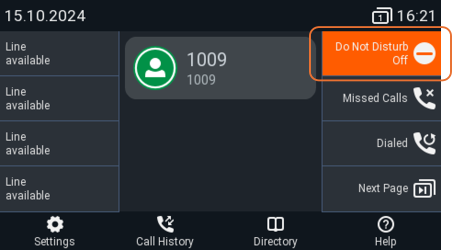
Web User Interface
Setup - Preferences - Appearance - Fkey Pressed Background Color
Phone User Interface
N.A.
Auto-provisioning
Parameter | Description |
|---|---|
<smartlabel_pressed_background_color perm="PERMISSIONFLAGS">VALIDVALUE</smartlabel_pressed_background_color> | <RED> <GREEN> <BLUE> <Transparency (optional)> A group of 3 numbers, each >=0 and <=255. First number is the RED value, followed by GREEN, BLUE and optional alpha/transparency (alpha will default to 255 if it is not set) |