Direct link to xml file
Maxwell Basic, 2 and 3
Below you can find examples via different Methods how to provide the device with an provisioning URL and which files are downloaded.
There are 2 versions of XML files that can be downloaded:
- Version 1.0 where multiple files are used to download Software, settings and special parameters.
- Version 1.1 where one file is used that contains all. (Preferred method) Below is described how to create one xml file with all parameters.
URL via: | URL | Download | Comment |
|---|---|---|---|
Redirect server | http://<SERVER URL>/%MACD.xml | http://<SERVER URL>/<MAC>.xml | |
http://<SERVER URL>/AABBCCDDEEFF.xml | http://<SERVER URL>/AABBCCDDEEFF.xml | ||
http://<SERVER URL> | http://<SERVER URL>/provisioning.xml when provisioning.xml is not available http://<SERVER URL>/<MAC>.xml | The provisioning.xml contains information about the next files to be downloaded, see wiki article. | |
Web-interface | http://<SERVER URL>/%MACD.xml | http://<SERVER URL>/<MAC>.xml | |
http://<SERVER URL>/AABBCCDDEEFF.xml | http://<SERVER URL>/AABBCCDDEEFF.xml | ||
http://<SERVER URL> | http://<SERVER URL>/provisioning.xml when provisioning.xml is not available http://<SERVER URL>/<MAC>.xml | The provisioning.xml contains information about the next files to be downloaded, see wiki article. | |
DHCP option 114 | http://<SERVER URL>/%MACD.xml | http://<SERVER URL>/<MAC>.xml | |
http://<SERVER URL>/AABBCCDDEEFF.xml | http://<SERVER URL>/AABBCCDDEEFF.xml | ||
http://<SERVER URL> | http://<SERVER URL>/provisioning.xml when provisioning.xml is not available http://<SERVER URL>/<MAC>.xml | The provisioning.xml contains information about the next files to be downloaded, see wiki article. | |
DHCP option 66 DHCP option 15 is not available | http://<SERVER URL>/%MACD.xml | http://<SERVER URL>/<MAC>.xml | |
http://<SERVER URL>/AABBCCDDEEFF.xml | http://<SERVER URL>/AABBCCDDEEFF.xml | ||
http://<SERVER URL> | http://<SERVER URL>/provisioning.xml when provisioning.xml is not available http://<SERVER URL>/<MAC>.xml | The provisioning.xml contains information about the next files to be downloaded, see wiki article. | |
DHCP option 66 DHCP option 15 is available | http://<SERVER URL>/%MACD.xml | http://<SERVER URL>/%MACD.xml.<DHCP option 15> | Implemented for special provider |
http://<SERVER URL>/AABBCCDDEEFF.xml | http://<SERVER URL>/AABBCCDDEEFF.xml.<DHCP option 15> | ||
http://<SERVER URL> | http://<SERVER URL>.<DHCP option 15> |
XML file version 1.1
On the server, the xml file contains info about:
- Firmware
- NVM (Settings), all parameters can be found here.
- Custom
N510 IP PRO
Below you can find examples via different Methods how to provide the device with an provisioning URL and which files are downloaded.
URL via: | URL | Download | Comment |
|---|---|---|---|
Redirect server | http://<SERVER URL>/%MACD.xml | http://<SERVER URL>/<MAC>.xml | |
http://<SERVER URL>/AABBCCDDEEFF.xml | http://<SERVER URL>/AABBCCDDEEFF.xml | ||
http://<SERVER URL> | http://<SERVER URL> | No file will be downloaded. | |
Web-interface | http://<SERVER URL>/%MACD.xml | http://<SERVER URL>/<MAC>.xml | Web-interface: Configuration file (URL) field is used. |
http://<SERVER URL>/AABBCCDDEEFF.xml | http://<SERVER URL>/AABBCCDDEEFF.xml | Web-interface: Configuration file (URL) field is used. | |
http://<SERVER URL> | http://<SERVER URL>/42/2/master.bin | Web-interface: Dataserver field is used. | |
DHCP option 114 | http://<SERVER URL>/%MACD.xml | http://<SERVER URL>/<MAC>.xml/42/2/master.bin | For DHCP option 114, only use the option: http://<SERVER URL> |
http://<SERVER URL>/AABBCCDDEEFF.xml | http://<SERVER URL>/AABBCCDDEEFF.xml/42/2/master.bin | For DHCP option 114, only use the option: http://<SERVER URL> | |
http://<SERVER URL> | http://<SERVER URL>/42/2/master.bin | ||
DHCP option 66 | http://<SERVER URL>/%MACD.xml | http://<SERVER URL>/<MAC>.xml/<MAC>.xml | For DHCP option 66, only use the option: http://<SERVER URL> |
http://<SERVER URL>/AABBCCDDEEFF.xml | http://<SERVER URL>/AABBCCDDEEFF.xml/<MAC>.xml | For DHCP option 66, only use the option: http://<SERVER URL> | |
http://<SERVER URL> | http://<SERVER URL>/<MAC>.xml |
Configuration file (URL) auto provisioning
Below you can find how to configure the Configuration file (URL) via auto provisioning.
XML parameters:
<S_CONFIGFILE_URL class="string" value='"provider URL/xml/<MAC address>.xml"'/>
Please take care that extra ' ' are used.
|
|
|
|---|---|---|
S_CONFIGFILE_URL or BS_IP_Data.aucS_CONFIGFILE_URL[0] | max. 74 characters from (0-9,a-z,A-Z,-,.); default is empty From software 210 and higher, the placeholder %MACD is allowed, the device will replace this with it's own MAC address. Example: http://domain/path/%MACD.xml Important, the xml file name must contain capital letters <S_CONFIGFILE_URL class="string" value='"provider URL/xml/<MAC address>.xml"'/> or <BS_IP_Data.aucS_CONFIGFILE_URL[0] class="symb_item" value='"provider URL/xml/<MAC address>.xml"'/> | Settings -> Management -> Firmware Update -> Configuration file URL |
Web-interface:
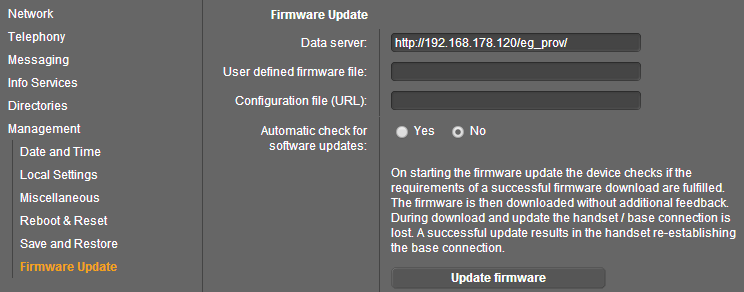
Settings - Management - Firmware Update - Configuration file URL:
N720 IP PRO
Below you can find examples via different Methods how to provide the device with an provisioning URL and which files are downloaded.
URL via: | URL | Download | Comment |
|---|---|---|---|
Redirect server | http://<SERVER URL>/%MACD.xml | http://<SERVER URL>/<MAC>.xml | |
http://<SERVER URL>/AABBCCDDEEFF.xml | http://<SERVER URL>/AABBCCDDEEFF.xml | ||
http://<SERVER URL> | http://<SERVER URL> | No file will be downloaded. | |
Web-interface | http://<SERVER URL>/%MACD.xml | http://<SERVER URL>/<MAC>.xml | Web-interface: Configuration file (URL) field is used. |
http://<SERVER URL>/AABBCCDDEEFF.xml | http://<SERVER URL>/AABBCCDDEEFF.xml | Web-interface: Configuration file (URL) field is used. | |
http://<SERVER URL> | http://<SERVER URL>/70/1/master.bin | Web-interface: Dataserver field is used. | |
DHCP option 114 | http://<SERVER URL>/%MACD.xml | http://<SERVER URL>/%MACD.xml/70/1/master.bin | For DHCP option 114, only use the option: http://<SERVER URL> |
http://<SERVER URL>/AABBCCDDEEFF.xml | http://<SERVER URL>/AABBCCDDEEFF.xml/70/1/master.bin | For DHCP option 114, only use the option: http://<SERVER URL> | |
http://<SERVER URL> | http://<SERVER URL>/70/1/master.bin | ||
DHCP option 66 | http://<SERVER URL>/%MACD.xml | http://<SERVER URL>/<MAC>.xml/<MAC>.xml | For DHCP option 66, only use the option: http://<SERVER URL> |
http://<SERVER URL>/AABBCCDDEEFF.xml | http://<SERVER URL>/AABBCCDDEEFF.xml/<MAC>.xml | For DHCP option 66, only use the option: http://<SERVER URL> | |
http://<SERVER URL> | http://<SERVER URL>/<MAC>.xml |
Configuration file (URL) auto provisioning
Below you can find how to configure the Configuration file (URL) via auto provisioning.
SYMB_ITEM ID="BS_IP_Data.aucS_CONFIGFILE_URL" class="string" value='"http://....path to xml file...."'/>
With this values IWU will download profile from aucS_CONFIGFILE_URL after every check-sync /reboot.
|
|
|
|---|---|---|
BS_IP_Data.aucS_CONFIGFILE_URL | max. 255 characters from (0-9,a-z,A-Z,-,.); default is empty | Not available. |
x. 255 characters from (0-9,a-z,A-Z,-,.); default is empty | System -> Firmware Update -> Configuration file URL |
Web-interface:
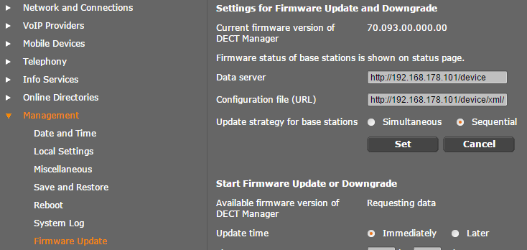
Settings - Management - Firmware Update - Configuration file (URL):
Maxwell 10
XML parameters:
<S_CONFIGFILE_URL class="string" value="provider URL/xml/<MAC address>.xml"/>
|
|
|
|---|---|---|
S_CONFIGFILE_URL | max. 74 characters from (0-9,a-z,A-Z,-,.); default is empty Important, the xml file name must contain capital letters. The usage of placeholders like %MACD will be supported soon. | Settings -> System -> Auto Provisioning -> Configuration file URL |
Web-interface:
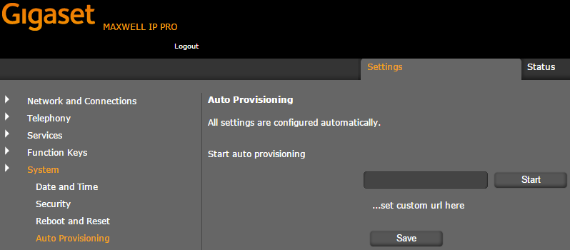
Settings - System - Auto Provisioning: