

HTTP digest
Introduction
HTTP Digest access authentication is one of the agreed-upon methods a device can use to negotiate credentials with a HTTP server to increase the security. This extra security can also be used during the HTTP Auto provisioning process.
HTTP digest is always been available in the Gigaset devices, but with the latest software additional functionality is added.
- N510 BL192 or higher.
- N720 BL84 or higher
- Maxwell Basic, 2 and 3
- Maxwell 10
- DE900/700 BL02.00.10 or higher
- DE410/310 BL02.00.07 or higher
When the device connects to the Auto provisioning server and will receive the message 401 unauthorised,
The device will try to connect again using the integrated Username (MAC) and Password (MAC-ID).
Then the provisioning server will answer again with the message 401 unauthorised because it is not the correct Username and Password.
The device will try to connect again using the Username and Password you have provided.
The configuration file will be downloaded.
This feature is often used in a Broadsoft Auto provisioning process.
Security
We only support HTTP Digest authentication. Only for testing, the DE devices also can use the HTTP Basic authentication.
N510 IP PRO
Web-Interface configuration
In the webinterface of the device go to: Settings - Security Settings - Server Authentication.
Enter the HTTP Digest Username and Password.
N510 web-interface
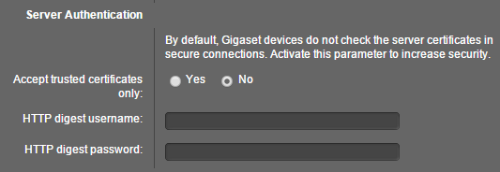
XML parameters
You can upload the HTTP digest and Username via auto provisioning.
Auto-provisioning parameter | Value | Meaning |
|---|---|---|
S_PROV_USERNAME | string max.50 chars | WebUI:Settings - Security - HTTP digest username Value will be stored in: BS_IP_Data.aucS_HTTP_DIGEST_USERNAME |
S_PROV_PASSWORD | string max 50 chars | WebUI:Settings - Security - HTTP digest password Value will be stored in: BS_IP_Data.aucS_HTTP_DIGEST_PASSWORD |
N720 IP PRO
XML parameters
You can upload the HTTP digest and Username via auto provisioning.
N720 web-interface
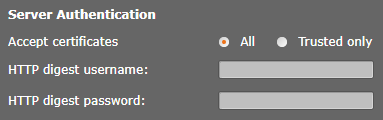
Auto-provisioning parameter | Value | Location in web-interface |
|---|---|---|
S_PROV_USERNAME | Max. 50 characters | <S_PROV_USERNAME class="string" value="broadsoft-username"/> |
S_PROV_PASSWORD | Max. 50 characters | <S_PROV_PASSWORD class="string" value="broadsoft-password"/> Available only when: I_PHONE_SYSTEM=5; symbolic NVM where custom parameter will be stored: BS_IP_Data.aucS_HTTP_DIGEST_PASSWORD |
I_PHONE_SYSTEM | 0=default setting;5=Broadsoft | <I_PHONE_SYSTEM class="integer" value="5"/> |
Maxwell Basic, 2 and 3
From software 2.25, the HTTP digest username and password can also be provided via the redirect server. See wiki article.
Auto-provisioning parameter |
|---|
System.Security.HTTPAuthUsername |
System.Security.HTTPAuthPassword |
Example: <param name="System.Security.HTTPAuthUsername" value="Username"/> <param name="System.Security.HTTPAuthPassword" value="Password"/> |
Maxwell web-interface
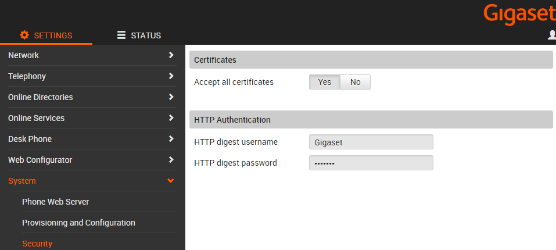
HTTP digest Username and Password via the keypad of the device
Available in:
- Maxwell Basic, 2 and 3
- Maxwell 10
- DE900/700 BL02.00.11 or higher
- DE410/310 BL02.00.08 or higher
Maxwell 10
The Maxwell 10 will show you a notification, when you click on this you have to enter the http digest username and password.
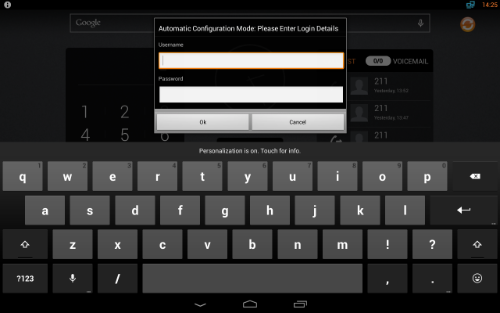
DE.. devices
When the device connects to the provisioning server and the username/password authentication fails, the device will show this in the display of the phone and you can enter these via the keypad of the device.
- User enters username and password and presses OK; phone tries to authenticate once
- User leaves it empty and presses OK; phone tries to authenticate once
- User does nothing and timeout; Phone stops authentication process
- User presses Back or Cancel; Phone stops authentication process
Phone saves the username and password only when authentication is passed.