Provisioning started manually
Introduction
Once a Gigaset device is auto provisioned, you can trigger the device to download the configuration file again without a restart / reset. For this you need to use the web-interface of the device.
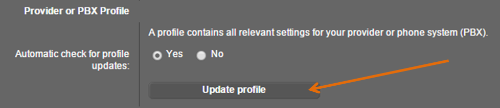
N510 IP PRO
In the web-interface go to: Settings - Telephony - Connections and press "Update profile"
N510 web-interface start provisioning.
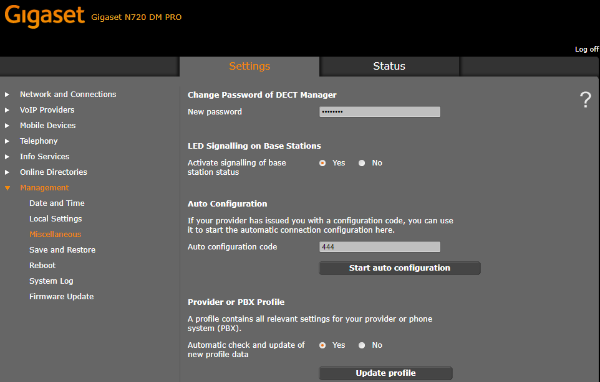
N720 IP PRO
In the web-interface go to: Settings - Management - Miscellaneous and press "Start auto configuration" or "Update profile" this depends on the settings of the device.
N720 web-interface start provisioning
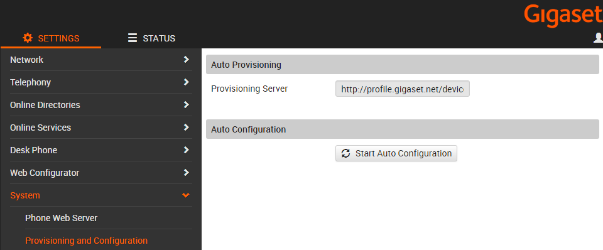
Maxwell Basic, 2 and 3
In the web-interface go to: Settings - System - Provisioning and Configuration and press "Start Auto Configuration"
Maxwell web-interface start provisioning.
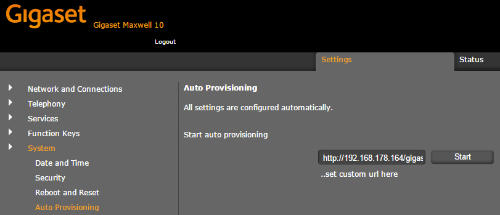
Maxwell 10
In the web-interface go to: Settings - System and press "Autoprovisioning"
The URL should point to your provisioning server.
Click on Start
Maxwell 10 web-interface start provisioning.