

Interop IP Devices XRC Services
XRC Services
About XRC Services
De XRC services Group verzorgt en ontzorgt IT- en Communicatiediensten. Het unieke portfolio van de XRC services Group is ondergebracht in branchegerichte dienstenpakketten die uitsluitend via gecertificeerde partners worden verkocht.
XRC services voorziet in het leveren van advies, hardware, software en (installatie)diensten op IT & Communicatie gebied binnen verschillende branches. Of het nu gaat om de noodzakelijke dataverbindingen voor telefonie omgevingen, beveiligingssystemen, multimediadiensten, kassacommunicatie, pinautomaten, netwerkbekabeling, ICT beheer of servicediensten.
See below for a list with supported features when using the Gigaset PRO IP Devices on the providers network.
Supported features
Feature | Maxwell 10 | Maxwell 3 | Maxwell 2 | Maxwell basic | N870 IP | N720 IP | N510 IP |
|---|---|---|---|---|---|---|---|
Software release: | 2.6.32 | 2.16.6 | 2.16.6 | 2.16.6 | 2.12.0 | 108 | 242 |
Basic Call | Yes | Yes | Yes | Yes | Yes | Yes | Yes |
Calling line (CLIP) | Yes | Yes | Yes | Yes | Yes | Yes | Yes |
Connected line (COLP) | -1 | -1 | -1 | -1 | -1 | -1 | -1 |
Anonymous call | -2 | -2 | -2 | -2 | -2 | -2 | -2 |
Do Not Disturb | Yes | Yes | Yes | Yes | Yes | - | - |
Message waiting | Yes | Yes | Yes | Yes | Yes | Yes | Yes |
Call list/history | Yes | Yes | Yes | Yes | Yes | Yes | Yes |
Voice mail deposit/retrieval | -1 | -1 | -1 | -1 | -1 | -1 | -1 |
Call waiting | Yes | Yes | Yes | Yes | Yes | Yes | Yes |
Call Hold / Toggle | Yes | Yes | Yes | Yes | Yes | Yes | Yes |
Call forward (CFU) | -2 | -2 | -2 | -2 | -2 | -2 | -2 |
Call forward (CFNR) | -2 | -2 | -2 | -2 | -2 | -2 | -2 |
Call forward (CFB) | -2 | -2 | -2 | -2 | -2 | -2 | -2 |
Call Transfer attended | Yes | Yes | Yes | Yes | Yes | Yes | Yes |
Call Transfer early attended | Yes | Yes | Yes | Yes | Yes | Yes | Yes |
Call Transfer unattended | Yes | Yes | Yes | Yes | Yes | - | - |
Call completed elsewhere | Yes | Yes | Yes | Yes | Yes | Yes | Yes |
DTMF (RFC2833) | Yes | Yes | Yes | Yes | Yes | Yes | Yes |
Conference 3pty | Yes | Yes | Yes | Yes | - | - | Yes |
BLF Busy / Idle indication | Yes | Yes | Yes | Yes3 | - | - | - |
Call pick-up direct | Yes | Yes | Yes | Yes | Yes | Yes | Yes |
Call pick-up group | Yes | Yes | Yes | Yes | Yes | Yes | Yes |
Call pick-up BLF | Yes | Yes | Yes | Yes3 | - | - | - |
Auto provisioning | Yes | Yes | Yes | Yes | -1 | Yes | Yes |
SIP Security | |||||||
SIPS | -2 | -2 | -2 | -2 | - | - | |
SIP via TLS | Yes | Yes | Yes | Yes | - | - | |
SRTP | Yes | Yes | Yes | Yes | - | - |
- | Not supported by device |
-1 | Not supported by the platform |
-2 | Platform feature via FAC |
3 | Via key extention module |
Feature codes
The following feature codes are supported by the platform.
code | feature |
|---|---|
*31* number | Anonymous call to this number |
*32* number | Toggle Code: Enables/Disabled anonymous call for the next call On or Off (Announcement) |
*32 | Toggle Code: Enables/Disable anonymous call for all calls On/Off (Announcement) |
#32 | Toggle Code: Enables/Disable anonymous call for all calls On/Off (Announcement) |
*35 | Toggle Code: Hotdesking to login/out on a device |
*35*[int] | Toggle Code: Hotdesking to login/out on a device |
*35*[int]*[pin] | Toggle Code: Hotdesking to login/out on a device |
*100 / #100 | Toggle Code: Login/off in waiting queue, dependent on your previous state. |
*101 / #101 | Login/off in all waiting queues. |
*102 / #102 | Change Waiting queue status for all queues to "break" |
*103 / #103 | Logoff from all waiting queues. |
1233 | Voicemail box of user |
*8 | Pick up first ringing |
*8[extension number] | Directed pickup of [Extension] |
*8[group number] | Group pickup |
*96 / #96 | Voicemail box of user |
*[xx] | Toggle Code: To activate/deactivate the dial plan with number xx |
1233 [vmbox-nr] | Listen to voicemail messages of voicemail box number [vmbox-nr] |
*96 [vmbox-nr] | Listen to voicemail messages of voicemail box number [vmbox-nr] |
#96 [vmbox-nr] | Listen to voicemail messages of voicemail box number [vmbox-nr] |
Auto provisioning
The Gigaset N510, N720 and Maxwell 10, Maxwell 3 and Maxwell basic are released behind the XRC Services platform including auto provisioning.
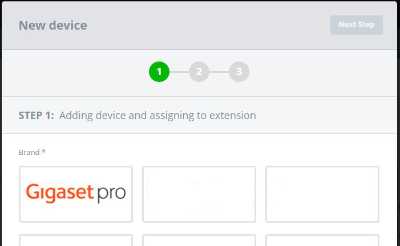
Go to Devices and click +Add and choose Gigaset pro:
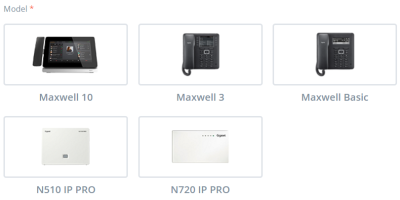
Select the desired certified Gigaset pro product:
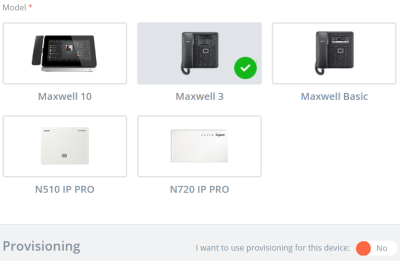
Enable auto-provisioning by clicking on No switch to change to Yes:
Enter the device MAC address and ID:
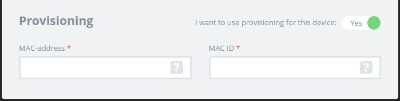
To finalize, click on next at the top.
When all steps are taken, like adding users and so on, the device will now automatically be added to the Gigaset pro redirect server.
Connect or restart the device and the device will auto-provisioned.