

Yeastar P-series - P710/P810(B)/P82X/P85X(B)W autoprovisioning
This page describes how to install the Gigaset P710/P810(B)/P82X/P85X(B)W desktop phones behind the Yeastar P-series PBX.
Yeastar, update of Auto Provisioning Templates
- Open the web-interface of the Yeastar system
- Go to Auto Provisioning - Resource Repository
- Click on Check for New Template
- Select as Vendor Gigaset to see all Gigaset templates
- Click on
 to download the new template or
  to refresh


Yeastar, add Phone
- Open the web-interface of the Yeastar system
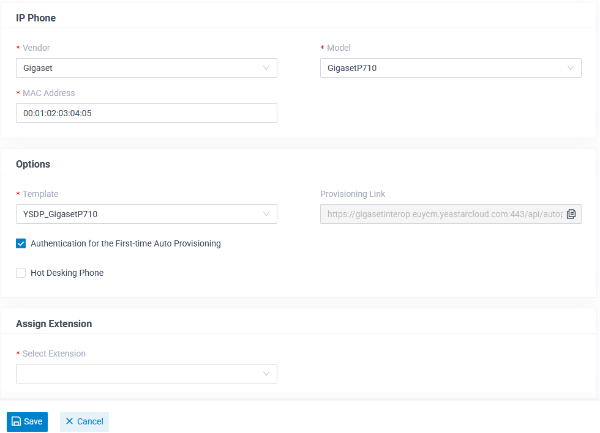
- Go to Auto Provisioning - Phones
- Click on Add
- Vendor: Gigaset
- Model: GigasetP710 or other type
- MAC Address: The MAC address of your device
- Template: YSDP_GigasetP710 or other type
- Select Extension: The Extension/user
- Copy the Provisioning Link
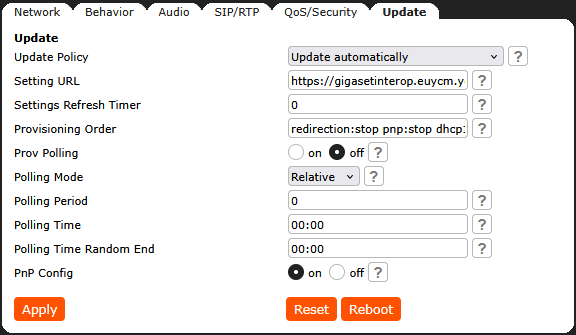
Gigaset, Provisioning URL
Copy and Past the above provisioning URL in the Gigaset P-series desktop phone.
Please add to the URL: /{mac}.xml
This is not required if the URL is got via:
- PnP (SIP multicast)
- GRAPE (Will be implemented by Yeastar)
Gigaset, Start provisioning
Start provisioning to get the configuration, can be done via:
- Reboot of the device
- On the phone: Settings - 5 - 4 - OK
After the first provisioning, an additional reboot is required.