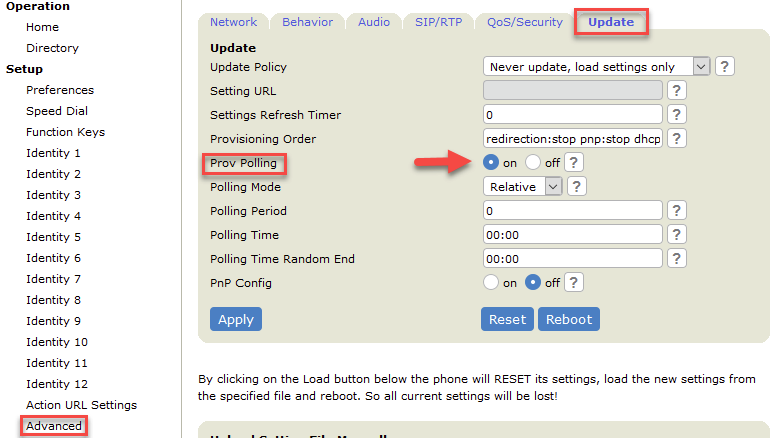
Provisioning polling
Provisioning polling allows phone administrators to schedule fetching the provisioning files (configuration and/or software updates) at a well defined interval or date/time. Be aware that by default the provisioning polling is off.
XML Configuration
<prov_polling_enabled perm="PERMISSIONFLAGS">VALIDVALUE</prov_polling_enabled>
Description | Valid Values | Default |
|---|---|---|
If set to on, the phone will periodically fetch the provisioning files (configuration and/or software updates). | on | off | off |
Example parameter
<prov_polling_enabled perm="R">on</prov_polling_enabled>
The phone offers 3 types of provisioning polling, choose the type you want to use and find below how to configure the needed parameters in your auto-provisioning file:
- Relative: This mode enables phones to check for updates in the provisioning files every X seconds.
- Absolute: This mode enables phones to check for updates in the provisioning files at an exact time, based on the 24-hour clock. You can set the time in the parameter Polling Time.
- Random: This mode enables phones to check for updates in the provisioning files randomly. The randomness depends on the period set in the Polling Period (in seconds)
To enable provisioning polling, open the Web Interface of your phone, click on Advanced -> Update and set Prov Polling to on.