

N610 - Repeater support
Valid for: | N530 | N610 |
|
|
|
|
|
|
Valid for N530, N610 but not supported by N670 / N870 / N870E. Software 2.53 or higher is needed.
If in a business environment more DECT coverage is needed, the best solution is to create an (Mini) multicell solution. A multicell offers more reliability, stability and parallel calls then a repeater solution.
If in some cases, a repeater solution is enough, the N610 supports unencrypted repeaters.
Repeater functionality:
- Up to 6 repeaters in star arrangement
- Connection is unencrypted
- 2 narrowband calls in extended DECT range
- Activation via provisioning
N670 and N870 do not support repeaters, for the N670/N870 (mini) multi-cell is available.
Auto-provisioning
Following provisioning file does apply RPN=1 to all base stations of a system. In singlecell system, to the one and only local base.
⚠️ DO NOT apply following provisioning file to any N670/N870/N870E.
<provisioning version="1.1" productID="e2">
<nvm>
<!-- ATTENTION: DO NOT apply this provisioning xml to N670/N870 system!!! It will break your N670/N870 system-->
<!-- Provisioning is not atomic! ===========================================
Provisioning is not atomic!
Wildcard-provisioning even more is not atomic!
Some settings depend on the other!
So the fully safe procedure to apply this provisioning file is to apply the provisioning twice:
1. Upload this provisioning file via web-ui.
2. "Start auto configuration", should be successful, confirm by OK!
3. "Start auto configuration", should be successful, confirm by OK!
4. Reboot the device.
-->
<param name="dm.local.LocalBaseRpn" value="1"/>
<param name="ConfirmedBaseStations.@.ucRpnIndex" value="0x1" />
<!-- ======================================================================== -->
<!-- MAC address in lower case, without ':' separator =======================
If you want to prevent wildcard provisioning,
you need to give the MAC address of the local base,
without ':' separators and in lower case letters:
<param name="dm.local.LocalBaseRpn" value="1"/>
<param name="ConfirmedBaseStations.589ec6123456.ucRpnIndex" value="0x1" />
======================================================================== -->
<param name="DmGlobal.0.DECTCipherDisable" value="1" />
<param name="DmGlobal.0.DECTEnhancedEncryption" value="0" />
<param name="DmGlobal.0.DECTCfSettings" value="0x00" />
<param name="DmGlobal.0.DECTBlindslots" value="0x0aaa" />
<param name="DmGlobal.0.WidebandEnabled" value="0" />
<param name="DmGlobal.0.DECTDSAA2" value="0" />
</nvm>
</provisioning>
Examples of provisioning files
- Provisioning file to (Above example)
Connect the repeater
When the above is done, the next step is to connect the repeater.
- Open the web-interface of the N610.
- Go to SETTINGS - Mobile devices - Registration Centre and click on Start now
- Set the repeater in registration mode FAQ Repeater - Registration
- All is successful when on the repeater, the left LED is constantly green
How to check in Web-UI and with handset MMI?
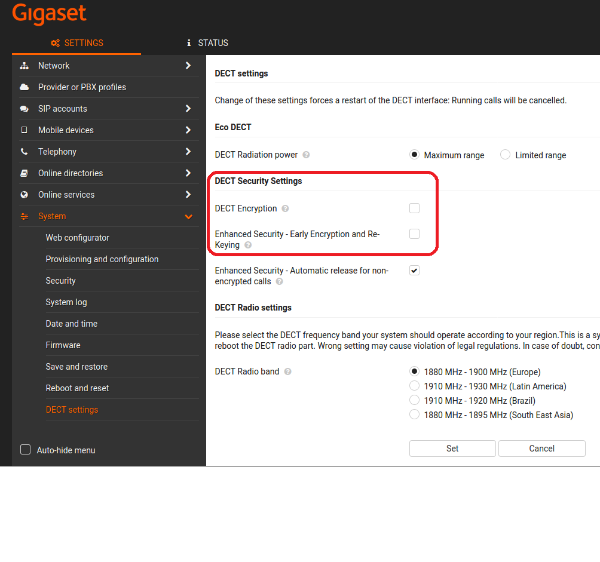
DECT Settings → DECT Encryption, early Encryption and re-keying is disabled to support transparent repeater operation.
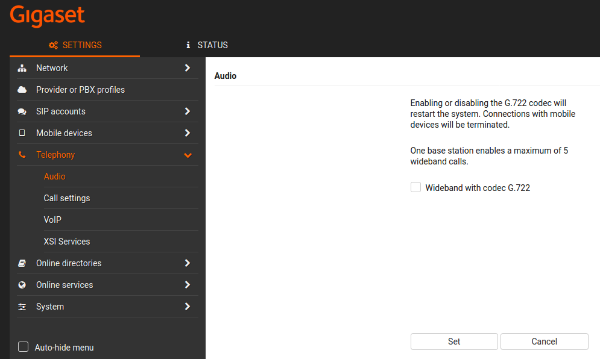
Telephony → Audio → Wideband Support must stay deactivated to support transparent repeater operation:
With a handset you could check the RPN in the RFP-Scan procedure
Open the dial window via long-press SEND button.

If your repeater is registered, you would see one or multiple results (depends on number of registered repeaters within DECT range).
Examples
1: One repeater is registered:
- N610: RPN ends with '1' or '9'
- Repeater: RPN ends with "2..7' or 'a..f'
2: Repeater support is deactivated
- N610: RPN ends with '0' or '8'
FPN=a6 RPN=00 RSSI=38
3: Repeater support is activated
- N610: RPN ends with '1' or '9'
FPN=a6 RPN=01 RSSI=38