FAQ SL850H / SL800H / S700H / R700H - Auto provisioning: Provisioning URL
Introduction
You can change the provisioning URL in the handset using the following procedure.
- Open the handset menu <Center key>
- *#provurl# or *#7768875#
- Enter the URL via the handset keypad
- Press the right softkey "Save"
Examples:
- http://192.168.178.192/dbb/handsetsettings.xml will download the handsetsettings.xml from the server with IP address 192.168.178.192
- http://profile.gigaset.net/dbb/handsetsettings.xml will download the handsetsettings.xml from the server with DNS name profile.gigaset.net
- ...
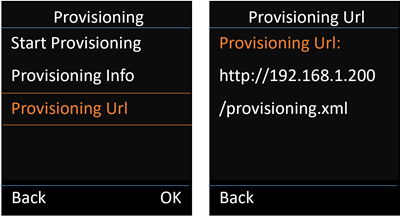
SL850 software 143.04 or higher we have implemented a new handset menu that displays the current configured provisioning URL: Settings - System - Provisioning - Provisioning URL (Menu-9-9-7-3)
Example: