

FAQ SL850H / SL800H / S700H / R700H - Auto provisioning: Start provisioning
Introduction
You can start provisioning via :
- Handset procedure
- Handset menu
- Automatic within a defined time frame, configured via auto-provisioning
Normal provisioning
This mode starts normal provisioning.
- Open the handset menu <Center key>
- *#provstart# or *#776878278#
Easy provisioning
From software version 11, we have implemented an easy provisioning method that can be used for testing provisioning.
- Open the handset menu <Center key>
- *#provskon# or *#77687566#
- The Right Softkey will now show Prov. by pressing this key provisioning will be started
- Softkey will disappear after device restart (off -> on)
Diagnostic provisioning
This mode allows to list errors seen during provisioning.
- Open the handset menu <Center key>
- *#provstartdiag# or *#7768782783424#
Format of the error presented on the screen: error_line#error_nr,
- error_line - the line in XML file where the error occurred
- error_nr - error code, see Table_1.
During the search, errors are displayed on the screen on the fly. Softkeys are not visible. Process will stop if the next error does not fit on the display. In this case, softkey "Continue" will appear, which resumes process. After process is finished, SK "OK" appear which leads to main menu. Provisioning procedure may be aborted by long-press on end key. In headline file number is visible, which can be helpful during nested provisioning procedure.
Table_1 | ||
#error_nr | Description | Examples |
|---|---|---|
Syntax errors | ||
1 | xml parsing interrupted (critical failure in configuration) | - |
2 | unexpected tag close | <nvm> </nmv> |
3 | exceeded declared count of opened tags (max 16) | <tag1><tag2><tag3><tag4><tag5><tag6>...<tag16><tag17> |
4 | incorrect close bracket | <root><a/root> |
5 | unrecognized file content (not XML file) | load not xml file (e.g. cmd.com) |
6 | incorrect tag name or unexpected character in tag name | < |
7 | invalid atribute (wrong character in name or value, missing '=') | <nvm atr '123' /> |
8 | quotation mark not found in argument value | <nvm atr=123 /> |
9 | buffer for value too small (supported max 255 characters) | <argument='12345678902354o63894675983465983465893469....' /> |
10 | unexpected end of file | <!-- not ended comments |
11 | the file ends without closing all tags | <root>example |
12 | invalid UTF-8 character coding in argument value If UTF-8 syntax error ocures in e.g. tag name, argument name, command the bug will not be reported | - |
13 | Unrecognized command (no DOCTYPE, no CDATA) | <!UNKNOWN > |
14 | Duplicated argmument name | <param name="volume" name="volume" /> |
Content errors | ||
20 | unrecognized tag | <incorrect_tag></incorrect_tag> |
21 | unrecognized argument | <nvm name='unrecognized_name' value='123' /> |
22 | incorrect argument value (e.g. out of range) | <nvm name='telephony_visible' value='123' /> |
23 | entry not saved (insufficient amount of data) | <lists><list list_name="contacts"><entry surname="Peter" /></list></lists> |
Handset menu
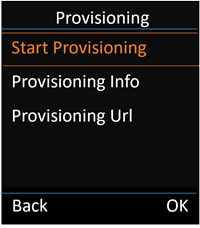
This is a new feature of the SL850H software 143.04, other handsets will follow.
SL850 software 143.04 or higher we have implemented a new handset menu that displays Provisioning information: Menu (Center key) - Settings - System - Provisioning - Start Provisioning (Menu-9-9-7-1)
Automatically within a defined time frame.
This can be set via auto-provisioning
Parameter | value |
|---|---|
provisioning_time_frame_begin | Time (in format HHMM) |
provisioning_time_frame_end | Time (in format HHMM) |
provisioning_selected_days |
Days names may be separated only by single comma ','. No other character is allowed. Any incorrect character causes value rejection. Comma ',' cannot start or end string. Day name may occur only once in a string.; |
Example: <?xml version="1.0" encoding="UTF-8"?> <param name="provisioning_time_frame_begin" value="1510" /> </provisioning>
| |