

FAQ Desktop - quick_transfer
Description
If quick_transfer:
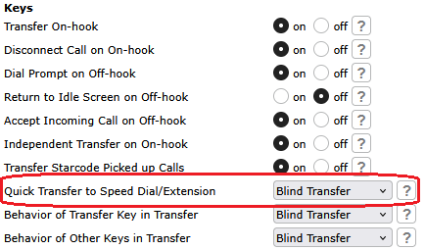
- new_call, pressing a BLF / Extension / BLF (Server) key during an active call will put the active call on hold and a new call will be initiated dialling out to the configured number associated with the key.
- blind, pressing a BLF / Extension / BLF (Server) key during an active call will blind transfer the active call to the configured number associated with the key.
- attended, pressing a BLF / Extension / BLF (Server) key during an active call will put the active call on hold and initiate a new call to the configured number for attended transfer. User can complete the transfer as early attended or attended transfer via the "Transfer" key.
Web User Interface
Setup - Advanced - Behavior (Tab) - Keys (Section) - Quick Transfer to Speed Dial/Extension
Phone User Interface
N/A
Auto-provisioning
Parameter | Valid value |
|---|---|
<quick_transfer perm="PERMISSIONFLAGS">VALIDVALUE</quick_transfer> |
|