

FAQ Desktop - user_default_contact_uri
Description
Office communication server (OCS) offers the user the possibility of publishing additional phone numbers under which he or she is reachable. This information will published along with the user's presence information. When traversing a contact list on a Gigaset phone, a contact may be called by selecting it (i.e. scrolling until it is highlighted) and then pressing 'enter' or going off-hook. By default the contact's SIP URI is used to place the call. This setting allows the default to be changed to one of the published phone numbers. This is particularly useful in environments where OCS is used for presence only and voice is routed over a different server, as the OCS SIP URI cannot be used in this case to establish a voice call.
This setting is used by server directories such as
- Metaswitch
- LDAP
- Broadsoft XSI
- Broadsoft Xmpp Contacts
To control the behavior when user presses OK on a contact:- If set to:
- none (default), bring up the Contact Details screen of the contact
- main, directly dial the number that is considered the main one of the contact.
- For LDAP, the main number is by default the first number returned by server as telephoneNumber. This can be changed my editing setting ldap_telephonenumber_mapping . For example if you set ldap_telephonenumber_mapping to "home", the main number will be the first number returned by server as homePhone.
Web User Interface
Setup - Identities - SIP Settings (Tab): Default Contact Number

Phone User Interface
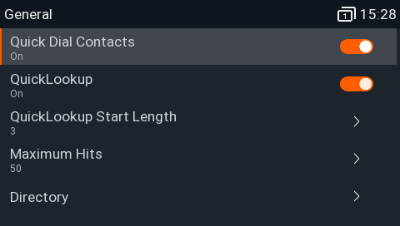
Press: Settings - Preferences - General - Quick Dial Contacts
Auto-provisioning
Parameter | Valid value |
|---|---|
<user_default_contact_uri idx="INDEX" perm="PERMISSIONFLAG">VALIDVALUE</user_default_contact_uri> |
|