FAQ - Bulk editor
Valid for: | N530 | N610 | N670 | N770 | N870 | N870E | Embedded Integrator | Virtual Integrator |
Introduction
From software 2.62 or higher, we have implemented the web-interface DECT handset Bulk editor.
This allows you to change handset settings for many handsets at the same time.
Web-interface
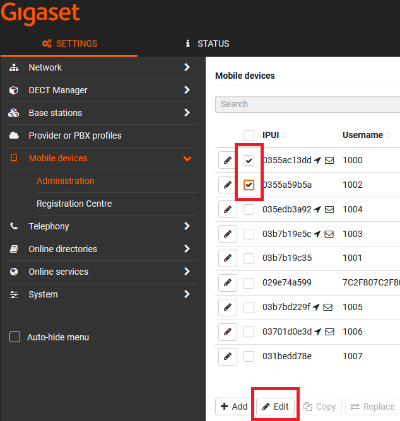
- Go to: SETTINGS - Mobile devices - Administration
- Select multiple handsets
- Click on Edit to open the bulk editor
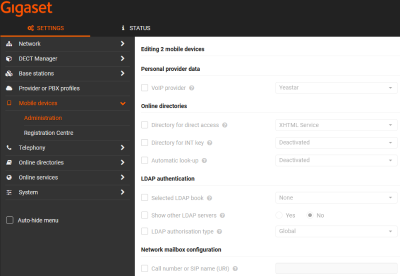
- Click the checkbox
 to enable the setting
 - Change the setting
- Click on Set to store the settings
The following settings are offered by the bulk editor
- Personal provider data
- VoIP provider
- Online directories
- Directory for direct access
- Directory for INT key
- Automatic look-up
- LDAP authentication
- Selected LDAP book
- Show other LDAP servers
- LDAP authorisation type
- Network mailbox configuration
- Call number or SIP name (URI)
- Group pick-up
- Call number or SIP name (URI)
- Call manager
- Accept call directly via Call Manager
- Missed calls and alarms
- Missed calls count
- Accepted calls count
- Flashing LED (MWI) for missed calls
- Flashing LED (MWI) for missed alarms
- Flashing LED (MWI) for network mailbox
- Feature key synchronization
- Feature key synchronization
- Licence
- Location
- Messaging