

FAQ - Access code
Valid for: | N530 | N610 | N670 | N770 | N870 | N870E | Embedded Integrator | Virtual Integrator |
Valid for N610 / N670 / N870 / N870E
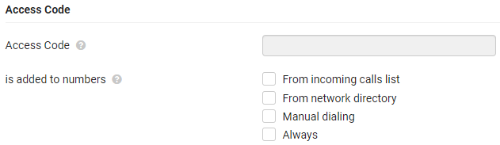 Depending on your Platform settings, you may need to insert an access code before the phone number for calls outside the area covered by your VoIP platform (External line prefix, e.g. "0")
Save an access code and specify when the phone numbers should be automatically prefixed with the digits. You can choose between:
- From incoming calls list
- From network directory
- Manual dialing (New in 2.53 or higher)
- Always
From software 2.49.1 we have added the option to ignore this access code for:
- Numbers shorter/equal then the defined number length (Internal numbers)
- With exception of specified emergency numbers where access code is required (example: 112 / 911)
Examples with access code = "0":
Manual dial number | From incoming calls list | From network directory | Always | Intern number length | Emergency numbers | Number dialed |
|---|---|---|---|---|---|---|
1234 | N.A. | N.A. |
| 0 | <Empty> | 1234 |
1234 | N.A. | N.A. |
| 0 | <Empty> | 01234 |
1234 | N.A. | N.A. |
| 3 | <Empty> | 01234 |
1234 | N.A. | N.A. |
| 4 | <Empty> | 1234 |
1234 | N.A. | N.A. |
| 5 | <Empty> | 1234 |
1234 | N.A. | N.A. |
| 4 | 1234 | 01234 |
From incoming calls list | From incoming calls list | From network directory | Always | Intern number length | Emergency numbers | Number dialed |
1234 |
| N.A. |
| 0 | <Empty> | 01234 |
1234 |
| N.A. |
| 3 | <Empty> | 01234 |
1234 |
| N.A. |
| 4 | <Empty> | 1234 |
1234 |
| N.A. |
| 5 | <Empty> | 1234 |
1234 |
| N.A. |
| 4 | 1234 | 01234 |
1234 | N.A. | N.A. |
| 4 | <Empty> | 1234 |
1234 | N.A. | N.A. |
| 5 | <Empty> | 01234 |
From network directory | From incoming calls list | From network directory | Always | Intern number length | Emergency numbers | Number dialed |
1234 | N.A. |
|
| 0 | <Empty> | 01234 |
1234 | N.A. |
|
| 3 | <Empty> | 01234 |
1234 | N.A. |
|
| 4 | <Empty> | 1234 |
1234 | N.A. |
|
| 5 | <Empty> | 1234 |
1234 | N.A. |
|
| 4 | 1234 | 01234 |
1234 | N.A. | N.A. |
| 4 | <Empty> | 1234 |
1234 | N.A. | N.A. |
| 5 | <Empty> | 01234 |


Configuration
For now, the Internal number length and emergency numbers can be configured via auto-provisioning. Configuration via the web-interface will come in an next software update.
<provisioning version="1.1" productID="e2">
<nvm>
<!-- possible value 0-9 / default 0 / 0 will mean feature disabled -->
<param name="Telephony.0.IntNumberMaxLen" value="3" />
<param name="Telephony.0.EmergencyNumbers" value="123,112,911" />
</nvm>
</provisioning>