

FAQ - AML - Messaging

Valid for: |
| N670 | N870 | N870E | Embedded Integrator | Virtual Integrator |
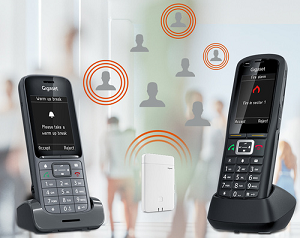
Here we describe the Messaging functionality with all options that can be set by an Certified Alarm server and how it is displayed to the user.
- Full screen message
- Message list
- Message priority
- Message ringtones
- Message title
- Message icons
- Message paragraph
- Message reply options
- Message list body starter
- Message list status
- Message list icons
- Local ignore
- Presentation timer
- Time To Live (TTL)
- Overrule silencing
- Overrule vibration
- Overrule message ringtone volume
- Delete messages from the message list
- Documentation
1. Full screen message
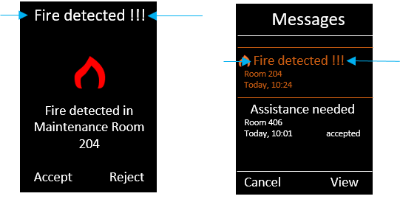
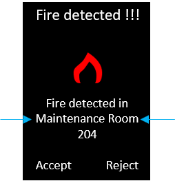
An DECT handset that is in IDLE mode when receiving an Message (Not for prio 9) will show this full screen on the handset display.

| 1 Message title |
2 Message icon | |
3 Paragraph | |
4 Reply options |
2. Message list
The Message list can be opened by pressing the blinking MWI key  .
.
This list contains Messages:
- Prio 1/3/6/8 not answered are moved to list after presentation time has passed
- Prio 1/3/6/8 that are answered (old) are moved to the message list
- Prio 9 messages
Messages where TTL time has passed will be removed from the message list automatically.

| 1 Message list headline |
2 Message title | |
3 Message list body starter | |
4 Date/time | |
5 Status information | |
6 Softkeys | |
7 Message list icon |
3. Message priority
Every message has it's own priority, set by the Alarm server. Below the overview about the priority behavior.
Prio | Type | Intrude active | Play | IDLE screen | Interrupt | Interrupt | Increase MWI | Description |
|---|---|---|---|---|---|---|---|---|
1 | Call based | • | • | • | • | • | • | Prio 1/3/6 are call based messages. When using call based messages, you have to look at the maximum parallel call system capacity. For example and N870 can handle up to 60 parallel calls, this means that when no handset is in a call, up to 60 messages can be send. If handsets are in a call, these have to be counted in the maximum signaling of messages. By using an Integrator it is easy to increase the number of parallel calls. Prio 2/4/5/7 are not defined and could be used in the future if more prio levels are needed. |
2/3/4=3 | Call based | - | • | • | • | • | • | |
5/6/7=6 | Call based | - | • | • | • | - | • | |
8 | IDLE display | - | "toc","toc" | • | - | - | • | Prio 8 messages are shown when the handset is in IDLE and does not occupy an DECT channel during signaling but briefly occupies an DECT channel during start of signaling. |
9 | Broadcast | - | "toc","toc" | - | - | - | • | Prio 9 messages, you need to open the message list to read the message. Occupies briefly an DECT channel during start of signaling |
4. Message ringtones
When using prio 1-7, the message signaling is call based and a ringtone can be used to signal the message.
The messaging server can define which ringtone should be played. The server can use the following 4 ringtone options.
- High
- Medium
- Low
- Silent
Which ringtone is used, can be changed via the handset menu by the user.
- Open handset menu: Settings - Audio settings - Ringtones (Handset) - Melodies
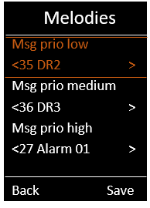
Click here to see the list with available ringtones:
5. Message title
The "title" is the
- First line of the message
- First line of the message when opening the message list
The title:
- Send by the message server via the MQTT interface (Example: "title":{"text":"Fire detected !!!"},)
- Up to 120 characters (depends on the handset)
- When more characters are send, the text is cut on the right side
6. Message icons
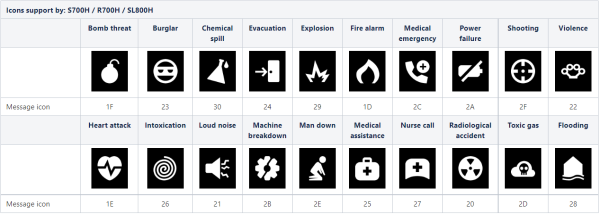
Icons can be used to visualize the incoming message type and priority.
- Send by the message server via the MQTT interface (Example: "body":[{"msg_icon":{"value":"4E","color":"04"}},)
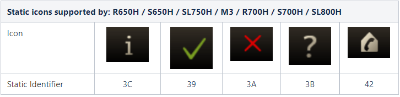
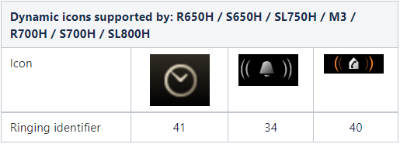
- Depends on the used handsets (See table below)
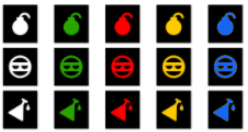
- Color white ("00") / green ("02") / yellow ("03") / red ("04") / blue ("05") (R700H /S700H /SL800H only )
- When wrong/not supported icon is send "i" icon will be shown ("3C")
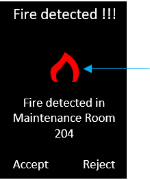
Message icons type R700H/S700H/SL800H:
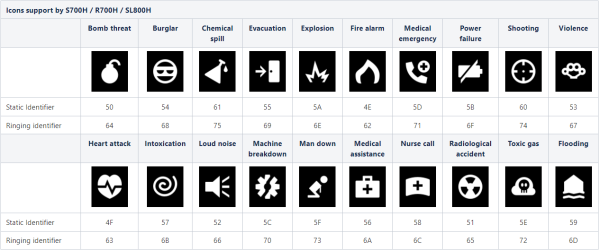
Message icons type/color:
Up to 5 colors are supported:
7. Message paragraph
The "paragraph" contains the main content of the message:
- Send by the message server via the MQTT interface (Example: {"paragraph":{"text":"Prio 1 message 1 low: some longer test to check how long the message can be","blink":"no","underline":"yes","bold":"yes","align":"left"}},)
- Up to 2 paragraphs per message
- 3 Lines of text shown on the display with center key down to show more lines
- Up to 17 characters per line (Depends on the handset)
- blinking
- underline
- bold
- align
- From software 2.44.0 or higher line break using \n is supported
Message Call (prio 1-7) | Info Display (prio 8) | Message list (prio 9) | |
|---|---|---|---|
line of text | multiple | max 3 line of text | multiple |
paragraph | 2 | 1 * | 2 |
scrollable | yes | no | yes |
decoration (blink/underline/bold/align) | yes | no | Yes |
alignment | depends of decoration (default left) | center | depends of decoration (default left) |
8. Message reply options
Via "reply_options" the softkeys can be configured:
- Send by the message server via the MQTT interface (Example: "reply_options":[{"option_id":"option_id_1","reply":{"text":"Msg1SK1"}},{"option_id":"option_id_2","reply":{"text":"Msg1SK2"}},{"option_id":"option_id_3","reply":{"text":"Msg1SK3"}}]}})
- Reply to a message
- Make a call
- Prio 8 is limited to 2 reply options
- Prio 9 does not support reply options
- Up to 10 reply options
Close message
The user can always close the message by pressing the "on hook key" (If allowed by the server)
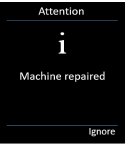
No reply option is send
- On the handset, the right softkey displays the "Ignore" option.
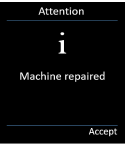
One reply option is send
- On the handset, the right softkey display the Reply option configured by the message server
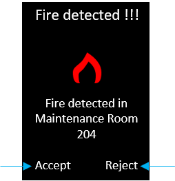
Two reply options are send
- On the handset, the left and right softkeys show both reply options
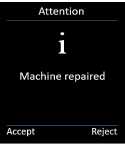
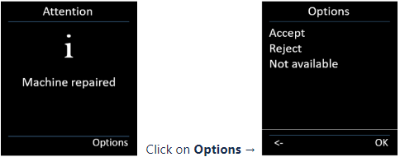
More then two reply options are send
- On the handset, the right softkey shows "Options"
- When pressed, the list with reply options are shown
9. Message list body starter
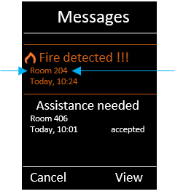
The body_starter is the text shown on line 2, shown when opening the Message list.
- Send by the message server via the MQTT interface (Example: "body_starter":"Room 204",)
- Provides a preview of the full message
- Text only
- Up to 32 characters (Depends on the handset)
- When more characters are send, alarm will not be signalled/handled
10. Message list status
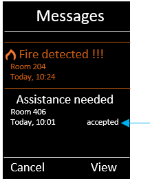
The message list status shows:
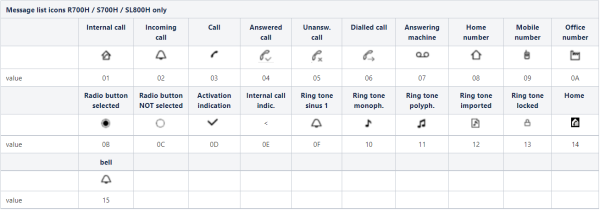
- Status of the message, set by the message server (Example: "status_icon":"28", "status_text":"accept",)
- If no icon is send, the status_text will be displayed
- If icon and text is send, only the icon will be displayed
- Icons are only possible with the R700H/S700H/SL800H
Supported icons:
11. Message list icons
An icon can be shown in the message list:
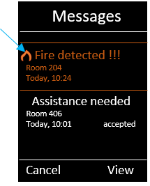
- Send by the message server via the MQTT interface (Example: "msg_icon":{"value":"28"},)
- Depends on used handset
12. Local ignore
The messaging server can send an "local_ignore" "yes/no" via the MQTT interface. (Example: "local_ignore":"yes",)
"Local_ignore" is "yes" | On incoming prio 1/3/6 message can be stopped the user by pressing the on-hook key. The handset goes to IDLE screen |
"Local_ignore" is "no" | A user can not stop the prio 1/3/6 message by pressing the on-hook key. The user needs to use the reply softkeys. When pressing the on-hook key the ringtone will stop but the message is still visible on the display. |
13. Presentation timer
The presentation timer is the time that the message will be signaled on the handset:
- Send by the message server via the MQTT interface (Example: "presentation_time":"15",")
- Valid for prio 1/3/6 call based messages
- maximum time = 120 seconds
14. Time To Live (TTL)
The TTL timer defines how long (seconds) a Message will stay in the system.
- Default value: "999999" , i.e. max 277 hours
- Messages in the message list will be removed after TTL
- The TTL time will be checked by the message service every minute. If TTL < 1 minute, it can happen that the message is removed after TTL time up to 1 minute.
15. Overrule silencing
If allowed by the administrator, the user can change the handset settings, that can cause incoming alarm messages not signaled in a proper way.
Via a new MQTT command, the following user settings can be overruled.
Requirement:
- N870/N670 software 2.44.0 or higher
- R700H PRO / S700H PRO / SL800H PRO with software version 10.04 or higher
- Other (PRO) handsets do not support this feature
- MQTT command: "overrule_silencing":"yes" or "overrule_silencing":"no",
- Silent charging
- When enabled and overrule_silencing = no then incoming message is signaled on display only.
- When enabled and overrule_silencing = yes then incoming message is signaled on display and with ringtone.
- Anon. Calls Silent
- When enabled and overrule_silencing = no then incoming message is signaled with 4 seconds delay
- When enabled and overrule_silencing = yes then incoming message is signaled on display and with ringtone.
- Time control
- When enabled and overrule_silencing = no then incoming message is signaled on display only.
- When enabled and overrule_silencing = yes then incoming message is signaled on display and with ringtone.
MQTT command |
|---|
"overrule_silencing":"yes", |
16. Overrule vibration
If allowed by the administrator, the user can disable the handset vibration setting.
Via a new MQTT command, the vibra can be activated to signal the incoming message. The vibra setting itself is not changed.
Requirement:
- N870/N670 software 2.44.0 or higher
- R700H PRO / S700H PRO / SL800H PRO with software version 10.04 or higher
- Other (PRO) handsets do not support this feature
- MQTT command: "vibration":"yes",
17. Overrule message ringtone volume
If allowed by the administrator, the user can change the message ringtone volume.
Via a new MQTT command, the ringtone volume of the incoming message can be changed from 00% to 100% . The ringtone volume setting itself is not changed.
Requirement:
- N870/N670 software 2.44.0 or higher
- R700H PRO / S700H PRO / SL800H PRO with software version 10.04 or higher
- Other (PRO) handsets do not support this feature
- MQTT command: "ringtone_volume":"100",
The following handset settings can be overruled with this MQTT command
- Manual ringtone volume setting
- Audio profile "Silent"
18. Delete messages from the message list
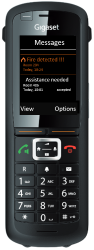 If allowed by the administrator, the user can delete messages from the message list.
Via a new MQTT command, the user is allowed (or not) to delete messages from the message list.
Open the message list, select the message, click on Options and depends on the message option send by the AML server, the message can be deleted yes or no.
Requirement:
- N870/N670 software 2.44.0 or higher
- R700H PRO / S700H PRO / SL800H PRO with software version 10.04 or higher
- Other (PRO) handsets do not support this feature
- MQTT command: "deletable":"yes",
19. Documentation