

FAQ - Blumit
Blumit
Blumit srl
Blumit Srl is an innovative SME based in Milan, founded by three partners specialised in the design, creation and management of software and hardware solutions for workplace safety, industrial automation and event management in the healthcare sector.
BlumApp
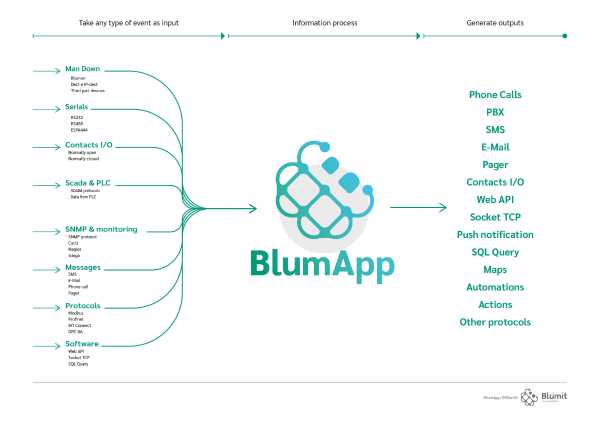
The proprietary BlumApp platform, present on the cloud or installable on any server (appliance, virtual or physical), is able to take any type of event as input (regardless the systems that generate it), process the information contained and then generate of the outputs. BlumApp is the first, innovative, platform aimed at solving problems related to data and event management in the industrial and healthcare fields, mainly focused on workplace safety, industrial automation, logistics, access control and evacuation, nurse call and patient escape.
The BlumApp project, conceived in line with the logic of ” Industry 4.0 ″, of the most advanced systems of industrial automation and with the most recent IOT trends, it has the ambition to become one of the reference solutions for some business problems such as solitary work, protection from alarms in the industrial sector, access and evacuation control, personnel safety , the need for integration of heterogeneous systems in the industrial and healthcare world.
Application areas:
- Security
- Health sector
- Industrial automation
- Home automation
- Logistics
- IOT
- Access control
More information on the WebSite:
and on the whitepaper:
2024/04/16 00:00Full support of the handset R700H Protect PRO.
See below for a list with supported features when using the Gigaset Nx70 together with the Blumit management platform.
AML Feature | Supported | |
|---|---|---|
Send message prio 1 - 9 | • | |
Title: Text | • | |
Title: Color (White / Green / Yellow / Red / Blue) | • | |
Icons: Type, supporting the Gigaset icon range | • | |
Icons: Color (White / Green / Yellow / Red / Blue) | • | |
Ringtone: Melody prio Low / Medium / High / Silent | • | |
Ringtone: Set/overrule volume | • | |
Message paragraph 1: Text | • | |
Message paragraph 1: Color | • | |
Message paragraph 1: Align | • | |
Message paragraph 1: Blinking | • | |
Message paragraph 1: Bold | • | |
Message paragraph 1: Underline | • | |
Message paragraph 2: Text | • | |
Message paragraph 2: Color | • | |
Message paragraph 2: Align | • | |
Message paragraph 2: Blinking | • | |
Message paragraph 2: Bold | • | |
Message paragraph 2: Underline | • | |
Vibration: Enable yes/no | • | |
Silencing: Overrule the user silence settings | • | |
Delete message: Allowed yes/no | • | |
Ignore message: Allowed yes/no | • | |
Presentation timer: How long the message is displayed on the handset | • | |
Time to Live: How long the message is stored on the DECT system | • | |
Reply options: Using softkeys to reply on messages | • | |
Message user response: Server reacts on user handling/feedback | • | |
Location: Server can ask HS to send DECT signal information | • | |
Location: Server can ask HS to send BLE beacons information | • | |
Start Alarm call via key/number: Dial phone number | • | |