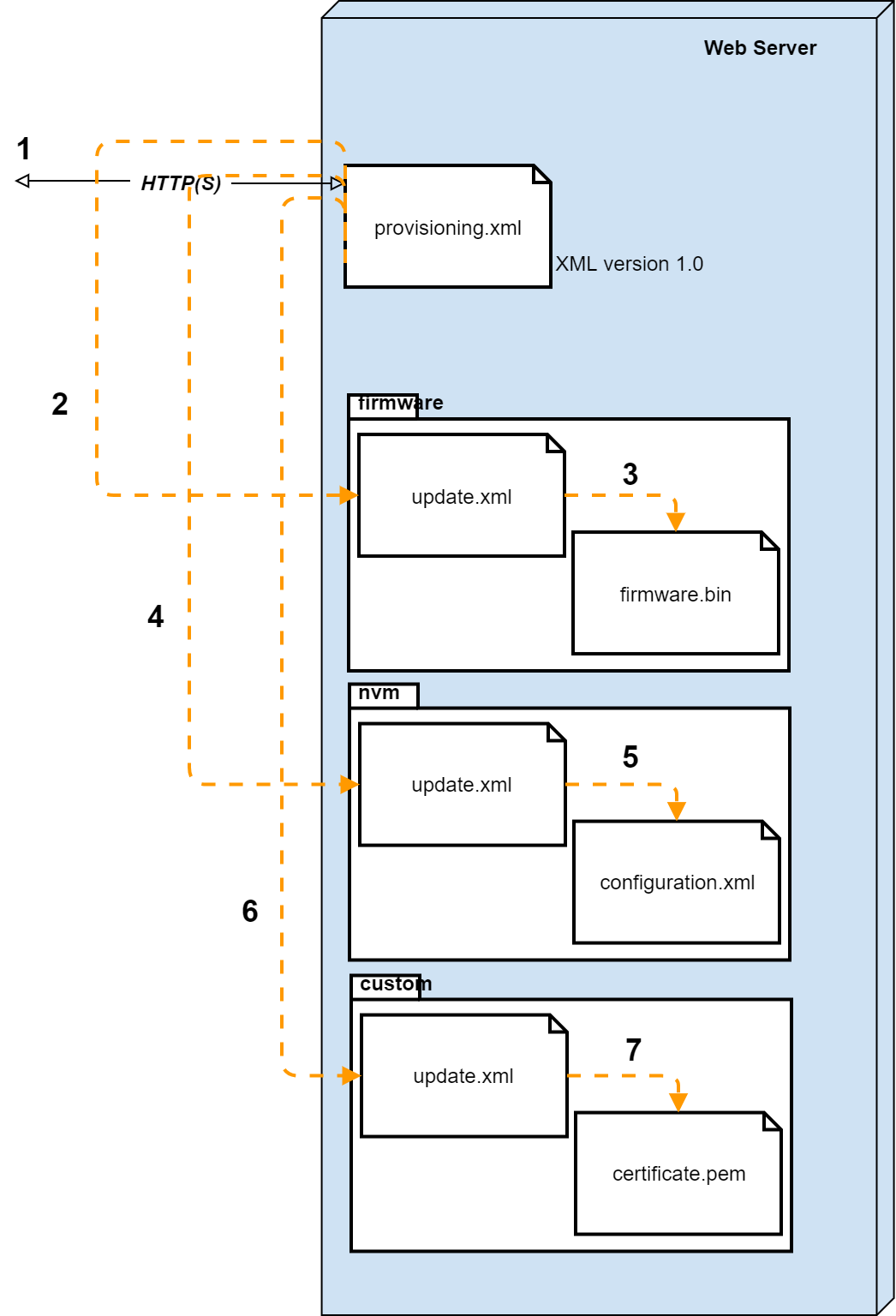
The auto provisioning flow is described below.
Preferred Method, all settings are in one XML file |
|---|
|
2e Method, usage of multiple XML files |
|---|
Multiple XML files
| | | | Via the "provisioning.xml" settings, the device will try to download information about the available firmware and will provide information where the firmware file can be downloaded (Step 4). This step is optional and could be skipped if needed. | | The "firmware/update.xml" provides the URL of the firmware file. This step is optional and could be skipped if needed. | | Via the "provisioning.xml" settings, the device will try to download information about the configuration file and will provide the URL where this file can be downloaded. (Step 6). This step is optional, but always used as configuration is always needed. | | The "nvm/update.xml" provides the URL of the configuration file. This file contains all configuration parameters. This step is optional and could be skipped if needed. | | Via the "provisioning.xml" settings, the device will try to download information about the custom settings file and will provide the URL where this file can be downloaded. (Step 8). This step is optional and could be skipped if needed. | | The "custom/update.xml" provides the URL of the custom settings, certificates, ... This step is optional and could be skipped if needed. |
|