

FAQ - Auto provisioning: Check-sync with reboot
Valid for: | N530 | N610 | N670 | N770 | N870 | N870E | Embedded Integrator | Virtual Integrator |
Introduction
The check-sync mechanism allows the initiation of a profile (configuration file) download from remote.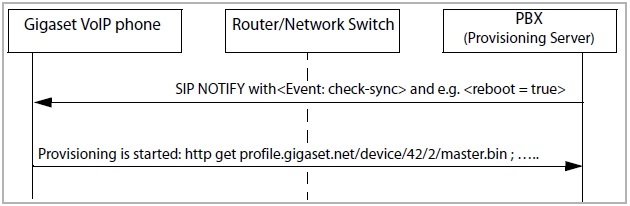
A SIP NOTIFY has to be used for sending the check-sync command. As additional information the protocol includes the switch, if a reboot has to take place (some operating systems need a reboot to make the new settings valid).
The following pictures show the principle of this.
A reboot is not needed to activate provisioning parameter changes !!!
Notify message without a reboot:
Notify message without a reboot:
NOTIFY sip:1011@192.168.1.106:5060 SIP/2.0
Via: SIP/2.0/UDP 127.0.0.1:5060;branch=z9hG4bK64a54719;rport
From: "Gigaset" <sip:Gigaset@127.0.0.1>;tag=as1fe8c38c
To: <sip:1011@192.168.1.106:5060>
Contact: <sip:Gigaset@127.0.0.1>
Call-ID: 2d9bacf75c2022d744a929ed6d7f3913@127.0.0.1
CSeq: 102 NOTIFY
User-Agent: Gigaset PRO
Max-Forwards: 70
Event: check-sync;reboot=false
Content-Length: 0
On customer request, we have added the option to reboot the device from remote via the check-sync with reboot=true command.
- Software 2.52 or higher is needed.
- Has to be enabled via auto-provisioning.
- Due to security reasons, must be send to a valid SIP account of the handset or provisioning SIP account
(Check-sync anonymous like some platforms use, will not trigger an reboot)
<provisioning version="1.1" productID="e2">
<nvm>
<param name="SystemSettings.global.CheckSyncRebootEnabled" value="1" />
</nvm>
</provisioning>
Notify message with a reboot
Notify message with a reboot
NOTIFY sip:1011@172.29.1.51:5060 SIP/2.0
Via: SIP/2.0/UDP 127.0.0.1:5060;branch=z9hG4bK69448a0c;rport
From: "Gigaset" <sip:Gigaset@127.0.0.1>;tag=as39b0fcab
To: <sip:1011@172.29.1.51:5060>
Contact: <sip:Gigaset@127.0.0.1>
Call-ID: 5f7fe6183735ef2b607bd7da0aaf12d0@127.0.0.1
CSeq: 102 NOTIFY
User-Agent: Gigaset PRO
Max-Forwards: 70
Event: check-sync;reboot=true
Content-Length: 0