

FAQ - Auto provisioning: SIP Multicast
Valid for: | N530 | N610 | N670 | N770 | N870 | N870E | Embedded Integrator | Virtual Integrator |
Introduction
The mechanism is offering an easy way for loading the URL of the provisioning server, on which the configuration files (Profiles) and / or the firmware files of the different Gigaset IP-phones are located.
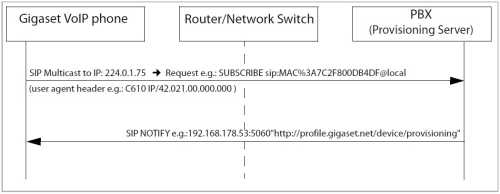
All Gigaset IP devices will send a SIP multicast after boot-up.
Mainly the mechanism is designed for VoIP PBX’s offering an own provisioning server for the connected VoIP phones.
Before an answer is send to the initiator of the SIP-Multicast, the PBX (or SoftSwitch) has to identify the phone. This is done via the SIP-User-Agent header, which is containing at first the product name.
The example flow chart shows the principle of this mechanism:
Disable SIP Multicast
If needed, via auto-provisioning you can disable the SIP Multicast.
Parameter | Value |
|---|---|
SystemSettings.global.SipMulticastEnabled | 0 = SIP Multicast disabled 1 = SIP Multicast enabled (Default) |
Example: <?xml version="1.0" encoding="UTF-8"?> <nvm> <param name="SystemSettings.global.SipMulticastEnabled" value="0"/> | |