

FAQ - Block new calls
Valid for: |
|
|
| N770 | N870 | N870E | Embedded Integrator | Virtual Integrator |
Introduction
For service purposes, it is possible to block new calls.
Block new calls
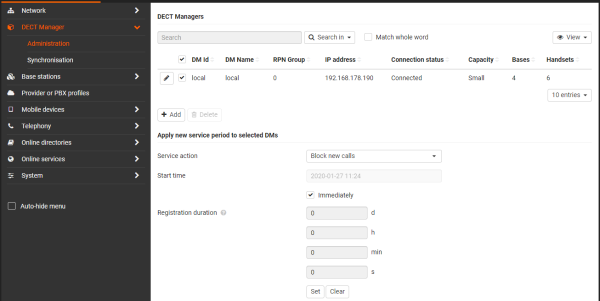
How to start Block new calls
In the web-interface go to SETTINGS - DECT manager - Administration - Block new calls
- Select the DECT manager where you can to block new calls (One or more DECT managers)
- Select the option Block new calls (Today the only option)
- Select the start time to block new calls or select Immediately
- Select how long you want to block new calls (Days / Hours / Minutes / Seconds)
- Press Set
On the handsets you will see the following message if the calls are blocked: Service temporarily blocked
In SIP when the handsets are called, the system will respond with: 480 temporary not available
How to end Block new calls
- Wait until the duration time is passed
- In the web-interface
- Select the DECT manager
- Select Block new calls
- Select Immediately
- Duration set to "0"
- Press Set
- Handsets will show the normal IDLE screen