

FAQ - Client certificate per service
| Valid for: | N530 | N610 | N670 | N770 | N870 | N870E | Embedded Integrator | Virtual Integrator |
Overview
From software version 2.70 we have introduced the possibility to:
- Upload multiple client certificates
- Assign them to a service:
- SIP, Provisioning, Firmware, LDAP directory, XSI Services, XHTML Service, Application Servers, Central phonebook, System log, XML Directories, WebUI
Web-interface
Open the web-interface and go to: SETTINGS - System - Security
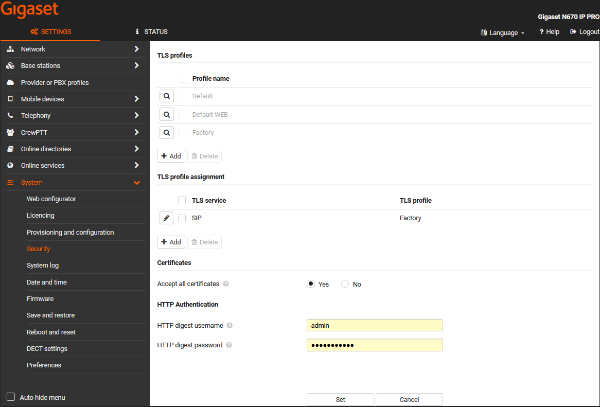
TLS profiles
Based on your device settings you will see the currently installed certificates mostly you will see:
- Default certificate: By default used for: SIP, LDAP directory, XSI Services, XHTML Service, Application Servers, Central phonebook, System log, XML Directories
- Default WEB certificate: By default used for: WebUI
- Factory certificate: By default used for: Provisioning, Firmware
You can Add your own client certificates or Delete installed client certificates.
TLS profile assignment
Allows you to assign services to use your preferred client certificate.
In the example below we want that also SIP is using the factory certificate.

Auto-provisioning
Create a TLS profile
<provisioning version="1.1" productID="e2">
<custom>
<step type="add_security_profile" certificate="/custom/certificate.pem" key="/custom/key.pem" key_password="mySecret" profile_name="Profile name" />
</custom>
</provisioning>
Delete a TLS profile
<?xml version="1.0" encoding="UTF-8"?>
<provisioning version="1.1" productID="e2">
<custom>
<step type="delete_security_profile" profile_name="Profile name" />
</custom>
</provisioning>
Assign a TLS profile
<?xml version="1.0" encoding="UTF-8"?>
<provisioning version="1.1" productID="e2">
<custom>
<step type="assign_security_profile" profile_name="Profile name" service_name="Service name" />
</custom>
</provisioning>
Where "Service Name" could be:
- CPM
- LDAP
- Mosquitto
- Provisioning
- Sip
- Swupdate
- Syslog
- WEB
- XHTML
- XML
- XSI
It's also possible to provide list of services to assign to
For example
<?xml version="1.0" encoding="UTF-8"?>
<provisioning version="1.1" productID="e2">
<custom>
<step type="assign_security_profile" profile_name="Profile name" service_name="Provisioning,CPM" />
</custom>
</provisioning>