FAQ - Communication / protocol / ports overview
Valid for: | N530 | N610 | N670 | N770 | N870 | N870E | Embedded Integrator | Virtual Integrator |
Introduction
In this wiki article we will describe how the DECT system communicate, via which protocol / port number.
Protocol | Integrator | DECT Manager | DECT Base | Direction | Port Number - Default | Optional | Description |
|---|---|---|---|---|---|---|---|
DHCP | Yes | Yes | Yes | Out | 67, 68 | ||
DNS | Yes | Yes | Yes | Out | 53 | ||
HTTP | Yes | Yes | Yes | In/Out (DM) - Out (Base) | 80 | Web-Interface (HTTP is disabled since 2.33.1): Integrator / DECT manager / DECT base | |
HTTPS | Yes | Yes | Yes | Out | 443 | ||
SIP | Yes | Yes | No | In/Out | UDP/TCP 5060, TLS 5061 | Can be changed | |
SIP Listen Ports | No | Yes | No | In | UDP/TCP/TLS 5060 /5061 | Random 5060-6000 | |
LDAP | No | Yes | No | Out | 389 | Can be changed | |
RTP/ SRTP | No | No | Yes | In/Out | UDP 5004 to 29002 | 240 ports per 1 BS from V2.28.0 60 (satellites) * 20 (Media Instances) * 2 (RTP streams) * 6(ports) = 14.400 RTP ports 100 (satellites) * 20 (Media Instances) * 2 (RTP streams) * 6(ports) = 24.000 RTP ports | |
NTP | Yes | No | No | Out | UDP 123 / TCP 37 | ||
Syslog | Yes | Yes | Yes | Out | TCP/UDP/TLS 514 | Can be changed | |
SNMP | Yes | Yes | No | In/Out | UDP 161, 162; TCP 161, 162 | Can be changed | SNMP statistics |
DECT discovery | No | Yes | Yes | In/Out | UDP 4711 / 4712 | Communication between DECT Base and DM | |
SSH | Yes | Yes | Yes | In/Out | TCP 22 | Communication between Integrator / DM / Base | |
PTPv2 | No | Yes | Yes | In/Out | UDP 319, 320 | LAN synchronisation | |
uaCSTA | No | Yes | No | In/Out | UDP / TCP / TLS 5060 | ||
MQTT | Yes | Yes | No | In (Int) - Out (DM) | TCP 8883 | Communication Integrator / DECT Manager | |
MQTT | Yes | No | No | In | TCP 8884 | ||
MQTT | Yes | No | No | In/Out | TCP 8885 | ||
MQTT | Yes | No | No | In/Out | TCP 8886 | ||
No | Yes | Yes | In (DM) - Out (Base) | TCP 811 | Cluster synchronization | ||
HTTP/XML | Yes | Yes | No | In (Int) - Out (DM) | TCP 8000 | Central Phone Book service | |
SFTP backup | Yes | No | No | Out | SSH 22 | Automatic backup |
System setup
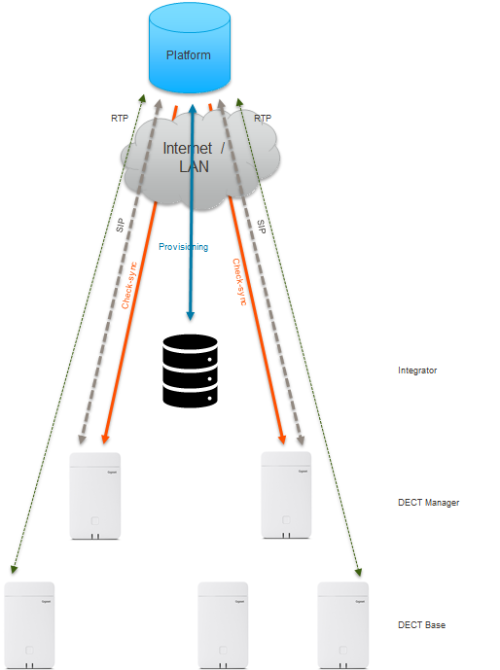
Dependent on the system setup, the communication flow towards the outside is done by one or multiple devices.
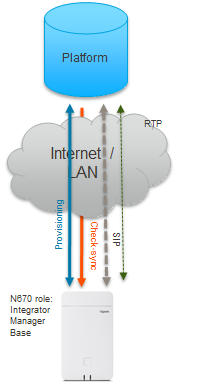
System setup one device handles all services. N670 or N870 with no extra base
Role | Picture | Protocol |
|---|---|---|
Platform |
| Provides all services for the phone |
Network | Transport layer between the device and platform | |
Integrator DECT manager DECT Base |
|
N870 in role Integrator only
Role | Picture | Protocol | ||
|---|---|---|---|---|
Platform |
| Provides all services for the phone | ||
Network | Transport layer between the device and platform | |||
N870 in role Integrator only |
| IP address: User-Agent: | ||
DECT manager |
| IP address: User-Agent: Gigaset N870 IP DM B PRO/83.V2.26.0+build.fafc63f;589EC6222222 | Some platforms do not like to receive different user-agents and put the N870 on the blacklist. It is possible to communicate with the outside world using the same user-agent. See this wiki article how this can be done. FAQ - Integrator one user agent In this example the MAC address of the Embedded Integrator is used. | |
DECT Base |
| IP address: |
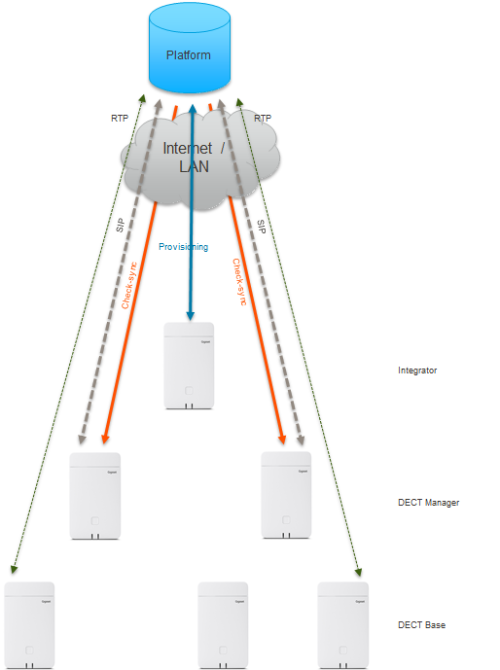
Virtual Integrator
Role | Picture | Protocol | ||
|---|---|---|---|---|
Platform |
| Provides all services for the phone | ||
Network | Transport layer between the device and platform | |||
Virtual Integrator |
| IP address: User-Agent: | In the User-agent the MAC address of the MASTER DM is used. | |
DECT manager |
| IP address: User-Agent: Gigaset N870 IP DM B PRO/83.V2.26.0+build.fafc63f;589EC6222222 | Some platforms do not like to receive different user-agents and put the N870 on the blacklist. It is possible to communicate with the outside world using the same user-agent. See this wiki article how this can be done. FAQ - Integrator one user agent In this example the MAC address of the Master DM is used. | |
DECT Base |
| IP address: |