

FAQ - Date and time
Valid for: | N530 | N610 | N670 | N770 | N870 | N870E | Embedded Integrator | Virtual Integrator |
Date and Time
Only available in the Integrator user interface.
By default, the system is configured so that the date and time are transferred from a time server on the internet. The page allows you to change the time servers, to set your time zone, and to make arrangements in case the internet time servers are not available.
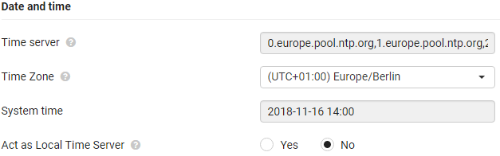
Time server
There are some common time servers preset in the field.
- Enter your preferred time server in the text field. Multiple time servers can be entered separated by commas. Value: max. 255 characters
Time Zone
- Select the time zone for your location from the option menu.
System time
Shows the time currently set for the phone system. It is updated every minute.
Fallback option
In case the internet time servers are not available you can set the time manually.
- Enter the time in the System time text field. Once you have started editing the automatic time update stops.
Act as Local Time Server
In case the fallback option is used, the setting Act as Local Time server must be set to Yes.
If Act as Local time Server is enabled, the device will not try to query the Configured (External) Time servers.
Auto-provisioning
Parameter | Description |
|---|---|
DmGlobal.0.NtpServer | Time server: There are some common time servers preset in the field. Enter your preferred time server in the text field. Multiple time servers can be entered separated by commas. Value: max. 255 characters |
DmGlobal.0.TimeZone | |
DmGlobal.0.NtpEnableLocalServer | 0 = No |