

FAQ - Group pick-up
Valid for: |
| N610 | N670 | N770 | N870 | N870E | Embedded Integrator | Virtual Integrator |
Introduction
With the feature group pick-up, the user can subscribe to a group pick-up service, and it will receive call notifications for all users in this pick-up group.
Web-interface
Open the web-interface of the N870 and go to: Settings - Mobile devices - Administration and select an handset.
Enter the number of the pick-up group.

Handset
On the handset you hear the notification tone and see the following message.
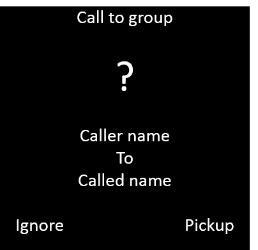
With the Left Soft key you can ignore the message.
With the Right Soft key you can Pickup the Call.
Auto-provisioning
Parameter | Description |
|---|---|
SipAccount.<Handset IPUI>.OpenScapeGroupPickupActive | 0 = Disable 1 = Enable |
SipAccount.<Handset IPUI>.OpenScapeGroupPickupAddress | Enter the Call number or SIP name (URI) of the pick-up group |
DmGlobal.0.CallPickUpAlertCall (New in Software 2.38) | 0 = Disable: Notification tone ("tok tok") is played 1 = Enable: Notification tone ("tok tok") and (External) Ringtone is played |