

FAQ - IEEE 802.1X
Valid for: | N | N610 | N670 | N770 planned | N870 planned | N870E planned |
|
|
From Software 2.67.0 we have added IEEE 802.1X for the N610 and N670, that can be enabled via auto-provisioning. If you need to have this feature urgently on N770 and N870(E), please contact your local Sales.
IEEE 802.1X is an IEEE Standard for port-based network access control. It is part of the IEEE 802.1 group of networking protocols. It provides an authentication mechanism to devices wishing to attach to a LAN.
802.1X authentication involves three parties:
- supplicant
- authenticator
- authentication server.
The supplicant is a client device (such as a DECT device) that wishes to attach to the LAN. The term 'supplicant' is also used interchangeably to refer to the software running on the client that provides credentials to the authenticator.
The authenticator is a network device that provides a data link between the client and the network and can allow or block network traffic between the two, such as an Ethernet switch or wireless access point; and the authentication server is typically a trusted server that can receive and respond to requests for network access, and can tell the authenticator if the connection is to be allowed, and various settings that should apply to that client's connection or setting. Authentication servers typically run software supporting the RADIUS and EAP protocols. In some cases, the authentication server software may be running on the authenticator hardware.
Enable IEEE 802.1 via auto-provisioning
You first need to enable IEEE 802.1x via auto-provisioning, .
<provisioning version="1.1" productID="e2">
<nvm>
<oper name="change_service_status">
<param name="eapd" value="1"/> <!-- 1 - enable service, 0 - disable service -->
</oper>
</nvm>
</provisioning>
Go to: SETTINGS - Network - IP/LAN
There will be a new setting: 802.1x Enable
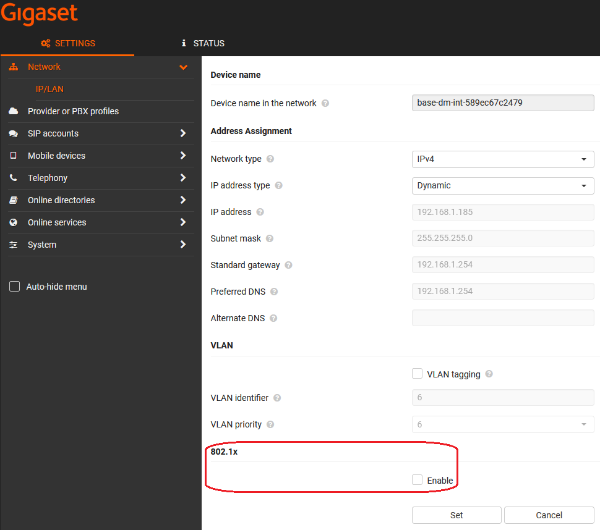
When enabled you will have the following mode:
- Not selected
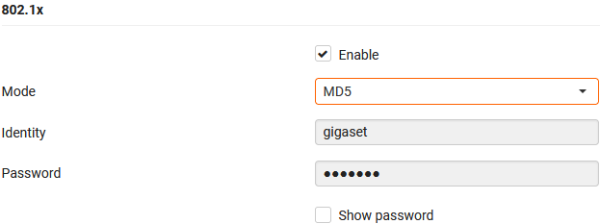
- MD5
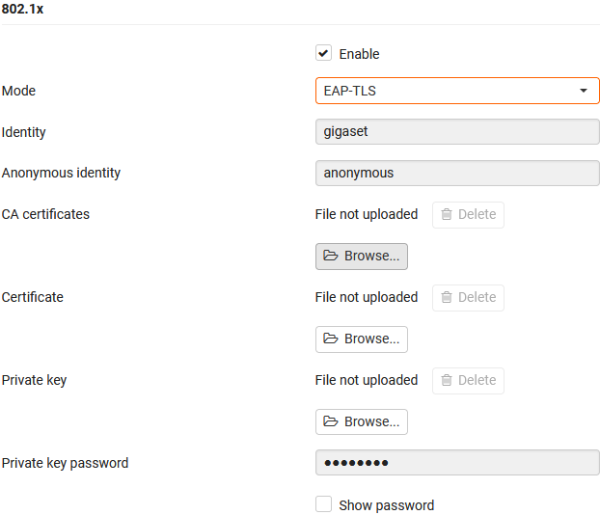
- EAP-TLS
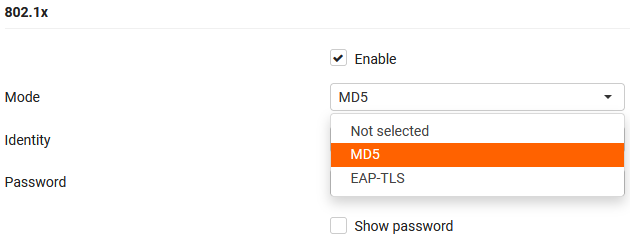
MD5
EAP-TLS
If you want to test it with N670 extra DECT base:
- Start as All-in-one
- Configure IEEE 802.1x
- Change role to DECT base