

FAQ - LED
Valid for: | N610 | N670 | N770 | N870 | N870E | Embedded Integrator |
|
Introduction
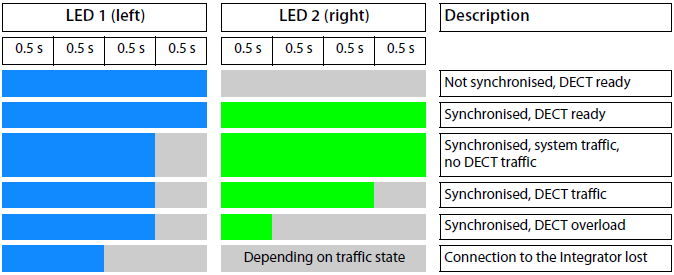
Depending on the device role the LEDs on the front side show different operational states. The LEDs can have three different colours (red, blue, green) or can be off.
DECT manager and base stations
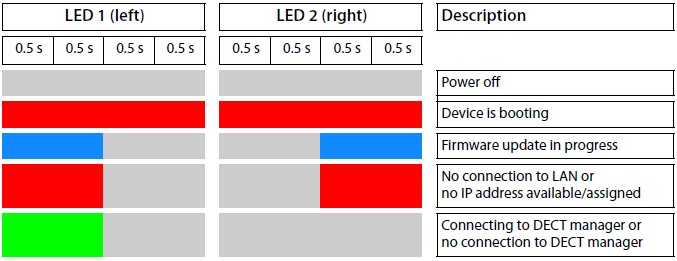
Base station operational states
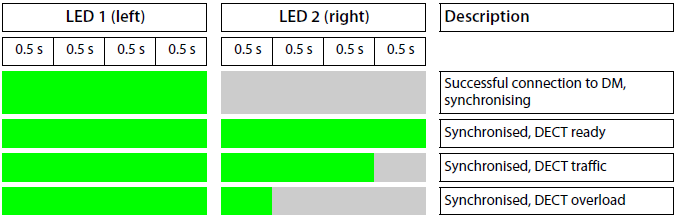
DECT manager (without DECT)


DECT manager (with DECT)
Disabled LED's via auto-provisioning
Via auto-provisioning you can disable the LED's on the devices.
Parameter | Description |
|---|---|
DmGlobal.0.bLedSignallingActive | Possibility to turn the LED's on the base Off or On. 0 = LED's off |
Example: <param name="DmGlobal.0.bLedSignallingActive" value="1"/> | |
Disabled LED's via the web-interface
From software 2.36 or higher it is possible to disable the LED's also via the web-interface.
In the web-interface go to: Base stations - Administration
