FAQ - License upgrade to N870 feature level
Valid for: |
| N670 |
|
|
|
|
N670 UPGRADE TO N870 FEATURE LEVEL (S30852-H2714-X3)
From software 2.38 it is possible to upgrade an N670 to an N870 feature level.
The table below describes the changes after upgrade.
Feature
N670 (No license installed)
N670 upgraded to N870 feature level
Max. number of DECT handsets
20
250
Max. number of additional Base stations
2
60
DECT base behind N670
Yes
No
DECT base behind N870
No
Yes
Behind Virtual Integrator as DECT manager
N670 DECT MANAGER LICENSE (S30852-H2714-X2)
Roaming between locations (DECT Managers) are not supported
Up to 300 (upgraded) N670 behind the Virtual Integrator
N870 DECT MANAGER LICENSE (S30852-H2716-X2)
Roaming between locations (DECT managers) are supported
Up to 100 (upgraded) N670 behind the Virtual Integrator
Behind Embedded Integrator as DECT manager
N670 DECT MANAGER LICENSE (S30852-H2714-X2)
Roaming between locations (DECT Managers) are not supported
Up to 20 (upgraded) N670 behind the Embedded Integrator
N870 DECT MANAGER LICENSE (S30852-H2716-X2)
Roaming between locations (DECT managers) are supported
Up to 20 (upgraded) N670 behind the Embedded Integrator
Device can have the following role:
- All-in-one
- DECT manager + DECT base
- DECT manager
- DECT Base
Integrator only- Internal telephony
- All-in-one
- DECT manager + DECT base
- DECT manager
- DECT Base
Integrator only- I
nternal telephony
User-agent
Gigaset N670 IP PRO/83.V2.43.0+build.5f0a106;7C2F80XXXXXX
Gigaset N670 IP PRO/83.V2.43.0+build.5f0a106;7C2F80XXXXXX
How to order a License
When you order a license, you need to add the MAC-ID of the device as the license is based on the MAC address of the device.
How to activate the license
The license can be activated:
- Upload license file
- Online access to the license server
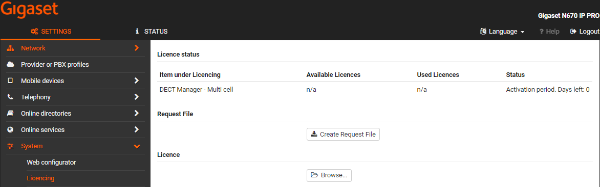
In the N670 web-interface go to: System - Licensing
How to delete the license
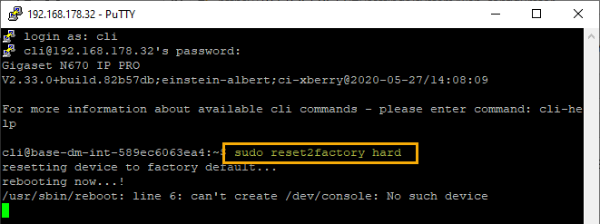
In case you need to remove this license you have to do it via the cli interface with "sudo reset2factory hard".
How to check if the license is activated
In the web-interface go to: SETTINGS - System - Licencing: Single cell to Multicell upgrade - 1 - 1 - Licence activated

Also the DECT Manager menu is now visible.