FAQ - Network IP/LAN
Valid for: | N530 | N610 | N670 | N770 | N870 | N870E | Embedded Integrator | Virtual Integrator |
Web-interface
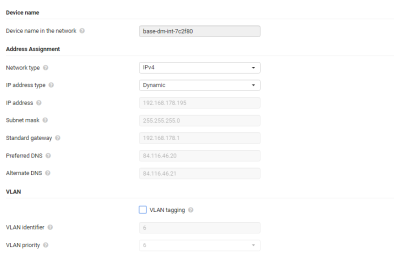
This page is used to integrate the DECT multicell system into your company‘s local network.
Parameter | Description |
|---|---|
Device name | |
Device name in the network | Is used to identify the device in network communication. |
Address Assignment | |
Network type | Select the IP protocol used in your local network: Currently only IPv4 is supported. |
IP address type | Select Dynamic, if your device receives the IP address via a DHCP server. |
IP address | This IP address allows your device to be reached by other subscribers in your local network. |
Subnet mask | Enter the subnet mask that is used by your network. |
Standard gateway | The Standard gateway is generally the router/gateway of the local network. Your Integrator/DECT manager device requires this information to be able to access the Internet. |
Preferred DNS | DNS (Domain Name System) allows you to assign public IP addresses to symbolic names. The DNS server is required to convert the DNS name into the IP address when a connection is being established to a server. |
Alternate DNS | The IP address for the alternate DNS server that should be used in situations where the preferred DNS server cannot be reached. |
VLAN | |
VLAN tagging | Select the check box next to VLAN tagging, if you want the phone system to use VLAN tagging. |
VLAN identifier | The VLAN identifier that uniquely identifies the subnetwork. Value range: 0–4094. |
VLAN priority | The VLAN priority allows voice data transport to take priority, for example. From the option menu select the priority for the phone system data. Value range: 0–7 (0 = lowest, 7 = highest priority) Ensure that the details in VLAN identifier or VLAN priority are set correctly. Incorrect settings can cause problems when connecting the DECT manger for configuration purposes. Internal connections between DECT manager and base stations are not tagged and therefore phone functions are not affected. |