
FAQ - SUOTA Push
Valid for: | N530 | N610 | N670 | N770 | N870 | N870E | Embedded Integrator | Virtual Integrator |
We have implemented Software Update Over The Air (SUOTA) with the following options:
- Disabled
- Manual (Default setting)
- Push: Start using SUOTA window 1
- Push: Start using SUOTA window 2
Manual is the default setting where via the manual handset procedure the SUOTA process can be started.
If the following requirements are met, the handset will show there is new Firmware available.
Push will trigger the selected handsets to start the SUOTA process in the service window.
The user will not be asked to confirm the firmware update. The user can always stop the firmware update.
When a handset is registered new, and the below requirements are set then the handset will ask to be updated.
SOUTA is enabled for all handsets
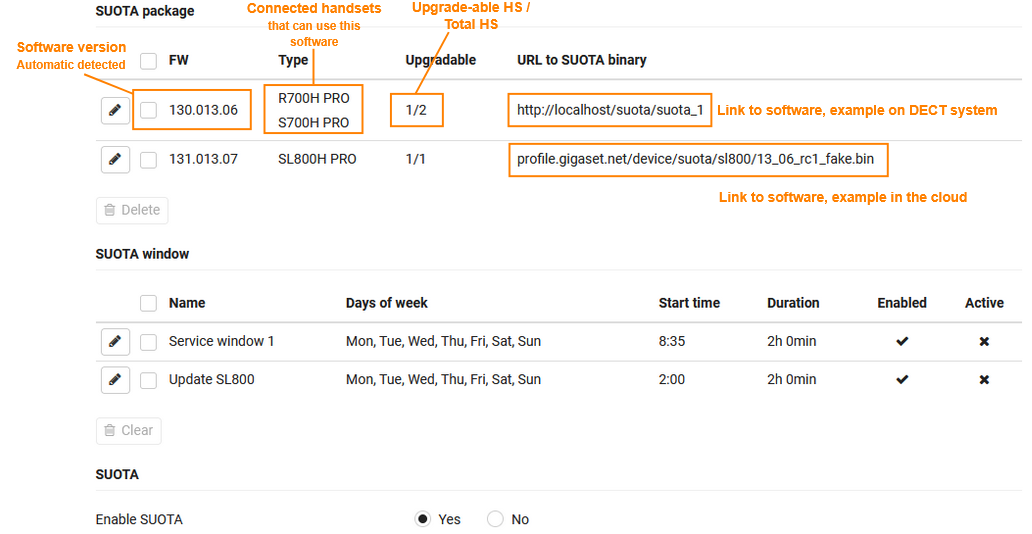
- A service window to upgrade selected DECT handsets with a new software
This service window allows:- Select a time period where handsets are not used and will not interrupt normal operations
- Up to 2 service windows can be configured
- Up to 2 firmware files can be hosted on our All-in-one system or firmware files can be hosted on an external server
Web-interface, software version 2.68 or higher
Settings - Mobile Devices - SUOTA
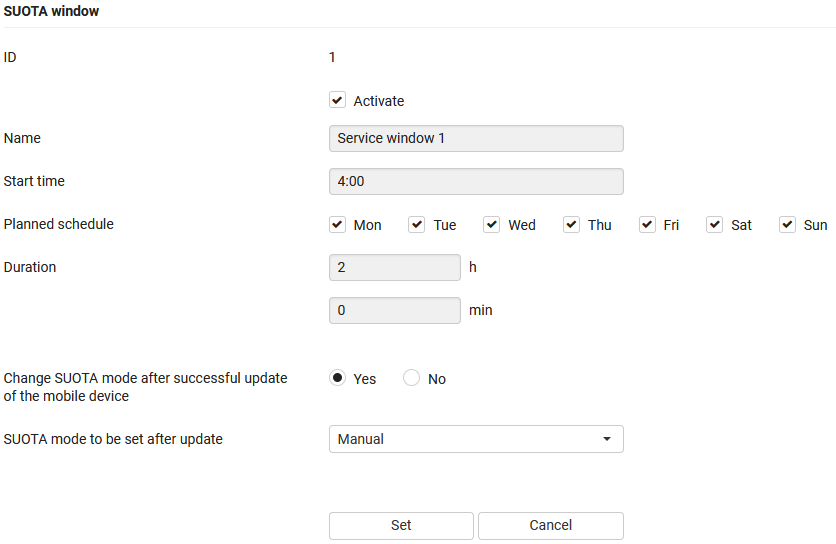
SUOTA window - Edit
Activate: Enable/disable the SUOTA window
Name: The name of the SUOTA window
Start time: The time the SUOTA window starts
Planned schedule: Select the days the SUOTA window should start. Handsets that where not updated, will be tried again in the next SUOTA window
Duration: The SUOTA window will be closed after the configured timer
Change SUOTA mode after successful update of the mobile device: When the firmware update for the handset was successful, the handset will be automatically assigned to the selected SUOTA mode to be set after update
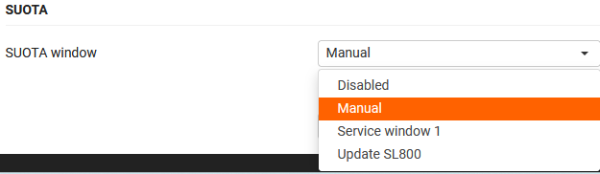
Handset setting: SETTINGS - Mobile devices - Edit -SUOTA
The following settings are available:
- Disabled: The handset can never use SUOTA
- Manual (Default): SUOTA can only be started via Handset menu or first time Handset registration
- Name of the first SUOTA window: SUOTA will be started by the DECT system using the first SUOTA window
- Name of the second SUOTA window: SUOTA will be started by the DECT system using the second SUOTA window
Auto-provisioning
<provisioning version="1.1" productID="e2">
<nvm>
<!-- switch on SUOTA -->
<param name="DmGlobal.0.SuotaEnable" value="1" />
<param name="SuotaPackage.1.Url" value="URL to firmware file" />
<!-- configure SUOTA window when SUOTA should be started (duration is given in minutes) -->
<param name="SuotaWindow.1.Enabled" value="1" />
<param name="SuotaWindow.1.Name" value="Window 1" />
<param name="SuotaWindow.1.StartTime" value="13:20" />
<param name="SuotaWindow.1.Duration" value="120" />
<param name="SuotaWindow.1.DaysOfWeek" value="mon,tue,wed,thu,fri,sat,sun" />
<!-- assign SUOTA window to the HS:
0 -> SUOTA not allowed for the HS
1 -> SUOTA window 1
2 -> SUOTA window 2
255- > only SUOTA pull is possible (currently default)
The @ sign takes care that all required handsets receive the SOUTA push trigger
-->
<param name="hs.@.SuotaWindow" value="1" />
</nvm>
</provisioning>
<provisioning version="1.1" productID="e2">
<nvm>
<oper name="set_webui_visibility">
<param name="menu.settings/mobile-devices/suota" value="hidden" />
<!-- To make it visible again change 'value' to "visible" -->
</oper>
</nvm>
</provisioning>
Syslog output example
Next opening of the SUOTA window 1 will be on 2025-09-26 13:20:00
SUOTA window 2 is not enabled
Next request in 151 seconds
wildcard write done
Download firmware version from: profile.gigaset.net/device/suota/...
The DECT system will download a partial of the file to collect the software version information.
HTTPHTTP/1.1 206 Partial Content
Next request in 7200 seconds
Trigger SUOTA push notification in window 1
Trigger SUOTA push notification to HS 0
HTTPHTTP/1.1 200 OK
After successful software update you will see:
Web-interface:

Syslog: