

FAQ - XML Phonebooks
Valid for: | N610 | N670 | N870 | N870E | Embedded Integrator | Virtual Integrator |
Introduction
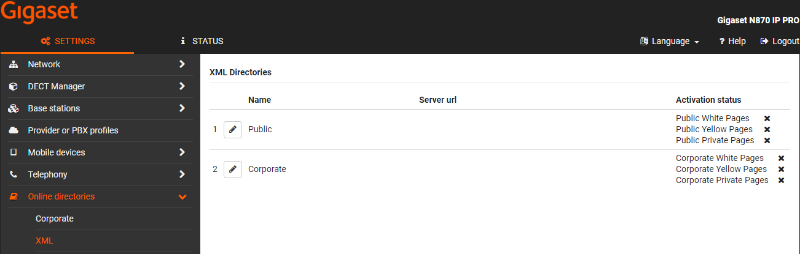
The device supports different XML phone-books
- Public White Pages
- Public Yellow Pages
- Public Private Pages
- Corporate White Pages
- Corporate Yellow Pages
- Corporate Private Pages
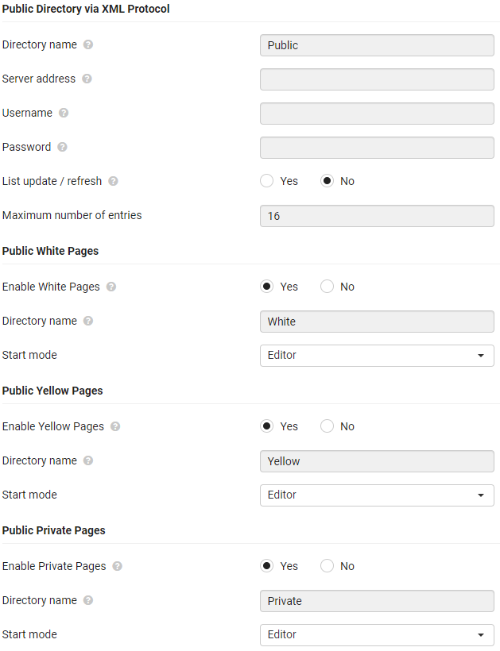
Public Directory
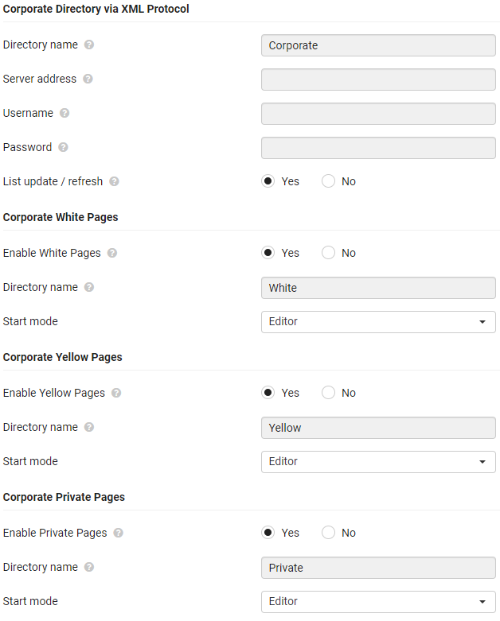
Corporate Directory
XML query
Phone-book | Query example |
|---|---|
Public White Pages | get%5flist&type=pb&fn=%2a&ln=A%2a&ct=%2a&st=%2a&hm=%2a&mb=%2a&fx=%2a&in=%2a&bp=%2a&nr=%2a&sip=%2a&zc=%2a&em=%2a&lang=3&first=1&count=16&mac=7C2F80E0D6D7&reqsrc=user&limit=8192 |
Public Yellow Pages | get%5flist&type=yp&wh=B%2a&ct=%2a&st=%2a&ln=%2a&cat=%2a&nr=%2a&hm=%2a&mb=%2a&fx=%2a&sip=%2a&zc=%2a&in=%2a&bp=%2a&lang=3&first=1&count=16&mac=7C2F80E0D6D7&reqsrc=user&limit=8192 |
Public Private Pages | get%5flist&type=pr&cpn=%2a&cat=%2a&bi=%2a&jid=%2a&fn=%2a&ln=B%2a&ct=%2a&st=%2a&hm=%2a&mb=%2a&fx=%2a&in=%2a&bp=%2a&nr=%2a&sip=%2a&zc=%2a&em=%2a&prid=1&lang=3&first=1&count=16&mac=7C2F80E0D6D7&reqsrc=user&limit=8192 |
Corporate White pages | get%5flist&type=pb&fn=%2a&ln=A%2a&ct=%2a&st=%2a&hm=%2a&mb=%2a&fx=%2a&in=%2a&bp=%2a&nr=%2a&sip=%2a&zc=%2a&em=%2a&lang=3&first=1&count=16&mac=7C2F80E0D6D7&reqsrc=user&limit=8192 |
Corporate Yellow pages | get%5flist&type=yp&wh=B%2a&ct=%2a&st=%2a&ln=%2a&cat=%2a&nr=%2a&hm=%2a&mb=%2a&fx=%2a&sip=%2a&zc=%2a&in=%2a&bp=%2a&lang=3&first=1&count=16&mac=7C2F80E0D6D7&reqsrc=user&limit=8192 |
Corporate Private pages | get%5flist&type=pr&cpn=%2a&cat=%2a&bi=%2a&jid=%2a&fn=%2a&ln=B%2a&ct=%2a&st=%2a&hm=%2a&mb=%2a&fx=%2a&in=%2a&bp=%2a&nr=%2a&sip=%2a&zc=%2a&em=%2a&prid=1&lang=3&first=1&count=16&mac=7C2F80E0D6D7&reqsrc=user&limit=8192 |
Parameters | |||
|---|---|---|---|
Type | pb = White pages / Public pages yp = Yellow pages pr = Private pages | ||
fn | First name | ||
ln | Surname | White / Private pages | |
wh | Category/Name | Yellow pages | |
ct | City | White / Yellow pages | |
st | Street name | ||
hm | Number | White / Private pages | |
mb | Mobile number | ||
fx | Fax number | ||
in | Internal number | ||
bp | Business number | ||
nr | House number | ||
sip | SIP number (VoIP number) | ||
zc | Zipcode | ||
em | |||
cpn | Company name | ||
cat | Category | ||
lang | Language | ||
first | Start position | White / Yellow / Private | |
Count | Maximum number of results from the server | White / Yellow / Private | |
Limit | Maximum amount of data for response | ||
MAC | MAC address of the client device | ||
reqsrc | Request source is a flag that indicate who starts phonebook search: auto auto lookup (search is started for number lookup service) | White / Yellow / Private | |
For more info see: Online directory | |||
Auto-provisioning
Web-interface | Parameter | Description | |
|---|---|---|---|
Public Directory | |||
Directory name | XMLDir.0.ProviderName | Enter a name for the directory. This is the name that will be displayed on the handsets when the user opens the directory list by pressing the directory key. | |
Server address | XMLDir.0.ServerURL | Enter the URL of the online directory provider. | |
Username | XMLDir.0.Username | Enter a global user name for the user access to the online directory. | |
Password | XMLDir.0.Password | Enter a global password for the user access to the online directory. | |
List update / refresh | XMLDir.0.EntCount | ||
Enter the maximum number of entries that are to be downloaded during one reading operation. | |||
White Pages | |||
Enable White Pages | Netdir.4.Activated | 0 = Disabled | |
Directory name | XMLDir.0.WhitePagesDirName | ||
Start mode | XMLDir.0.StartWithListWP | 0 = Editor | |
Yellow Pages | |||
Enable Yellow Pages | Netdir.5.Activated | 0 = Disabled | |
Directory name | XMLDir.0.YellowPagesDirName | ||
Start mode | XMLDir.0.StartWithListYP | 0 = Editor | |
Private Pages | |||
Enable Private Pages | Netdir.6.Activated | 0 = Disabled | |
Directory name | XMLDir.0.PrivatePagesDirName | ||
Start mode | XMLDir.0.StartWithListPP | 0 = Editor | |
Corporate Directory | |||
Directory name | XMLDir.1.ProviderName | Enter a name for the directory. This is the name that will be displayed on the handsets when the user opens the directory list by pressing the directory key. | |
Server address | XMLDir.1.ServerURL | Enter the URL of the online directory provider. | |
Username | XMLDir.1.Username | Enter a global user name for the user access to the online directory. | |
Password | XMLDir.1.Password | Enter a global password for the user access to the online directory. | |
List update / refresh | XMLDir.1.EntCount | ||
Enter the maximum number of entries that are to be downloaded during one reading operation. | |||
White Pages | |||
Enable White Pages | Netdir.1.Activated | 0 = Disabled | |
Directory name | XMLDir.1.WhitePagesDirName | ||
Start mode | XMLDir.1.StartWithListWP | 0 = Editor | |
Yellow Pages | |||
Enable Yellow Pages | Netdir.2.Activated | 0 = Disabled | |
Directory name | XMLDir.1.YellowPagesDirName | ||
Start mode | XMLDir.1.StartWithListYP | 0 = Editor | |
Private Pages | |||
Enable Private Pages | Netdir.3.Activated | 0 = Disabled | |
Directory name | XMLDir.1.PrivatePagesDirName | ||
Start mode | XMLDir.1.StartWithListPP | 0 = Editor | |