

FAQ - Base station events
Valid for: |
| N610 | N670 | N770 | N870 | N870E | Embedded Integrator | Virtual Integrator |
Introduction
This page displays counters for diagnostic purposes relating to various events that affect the base stations, e.g. active radio connections, handovers, unexpectedly terminated connections, etc.
In the web-interface go to: STATUS - Statistics -Base stations
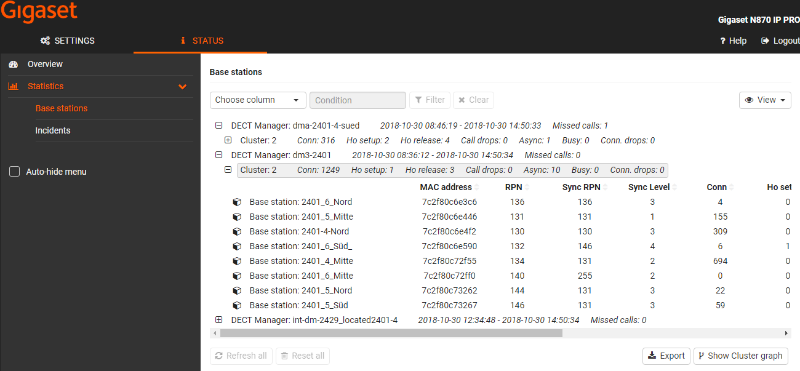
The following information is given: If you do not see columns mentioned below, it could be related that you need a newer software version.
Feature | Description |
|---|---|
DECT Manager | Name of the DECT manager responsible for the base stations, period of time during which the events have been collected, total number of missed calls of all managed base stations within the given time period.
|
Missed Calls | Count calls, that do not reach a handset on DECT air interface and so point to DECT air interface or coverage problems. As an example, remove the battery of an handset and then call this handset. The counter will increase. (Handset is not nicely turned off but hard power cut is done) A short call to a handset and then caller disconnects is not an missed call. A valid missed call is the handset is called, the caller hears a ringing tone. After around 3 ring signals, the handset can not be reached and the caller get's a busy tone, the counter in increased. |
Cluster | Cluster number, summary of the collected events for all cluster base stations.
|
Base station | Name of the base station |
Some of the following information may be hidden. Use the View option menu to display the desired columns. | |
MAC address | MAC address of the base station |
RPN | Radio Fixed Part Number, identifying the radio-entity |
Sync RPN | RPN of the other base station the base station is synchronising with |
Sync Level | Synchronisation level |
Conn | Number of connections, i.e. calls made |
Ho setup | Number of incoming handovers |
Ho release | Number of outgoing handovers |
Call drops | Number of lost connections, i.e. interrupted calls |
Async | How often the base station has lost on-air DECT synchronisation |
Busy | How often the maximum number of possible connections of the module was achieved. The base station has entered busy-state and pointed to other modules for load balancing. |
Conn. drops | How often the LAN connection to the base station was interrupted |
Calls | Active calls |
Calls-pk | Peak calls |
Sync swaps | |
q-idx-lt | Lan sync quality |
0-thr-exc | PTP offset threshold exceeded |
d-thr-exc | DLS offset threshold exceeded |
You can export this information into a CSV file.