

FAQ - Redundancy
Valid for: |
|
| N670 | N770 | N870 | N870E | Embedded Integrator | Virtual Integrator |
Introduction
This article explains how you can add redundancy to your DECT multi-cell system, it can be split in:
- Base stations level 2 - 15
- Base station level 1
- DECT manager
- Integrator
Base stations level 2 - 15 redundancy
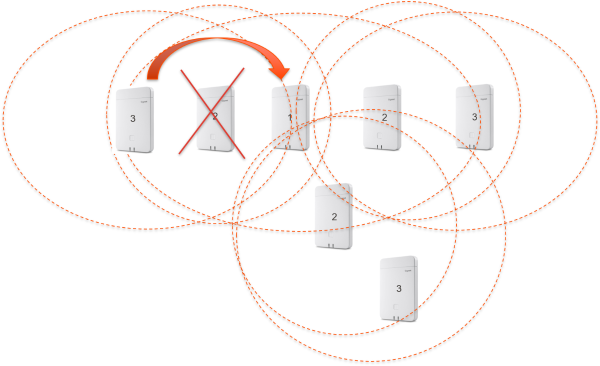 The N870 base-stations synchronised via DECT will automatically synchronize with a higher sync level. Base stations can and will skip a higher sync level if it can connect to an even higher sync level.
If you look at the picture, you can see that the base with level 3 will skip level 2, if level 1 can be seen with a good quality.
No redundancy:
Set-up: The base with level 3 can only see the base with level 2.
If the base with level 2 is down then also the level 3 base will be down. If more bases connect to this level 2 or 3 then also these bases will not be functional.
How to add redundancy:
To place the base stations more close to each other. In the example, the base with level 3 can see level 2 and level 1.
- Base with level 3 will automatically connect to level 1 if the quality is good enough
- If Level 2 is down then level 3 will still work as it can also connect to level 1
- The calls for the base with level 2 that is down will be handled by the level 1 and 3 (Capacity has to be calculated)
When the system is using LAN synchronisation then all Bases will connect to the LAN Master which is the level 1 base (mostly), then the next chapter "Level 1 redundancy" must be used to ensure redundancy.
Auto-provisioning
Parameter | Value |
|---|---|
ConfirmedBaseStations.<MAC>.ucSyncLevel | 0 For redundancy 1-15 for the standard sync levels |
Example: <param name="ConfirmedBaseStations.589ec60d90ca.ucSyncLevel" value="0"/> | |
Base station level 1 redundancy. Not valid for N610 and N670 !!!
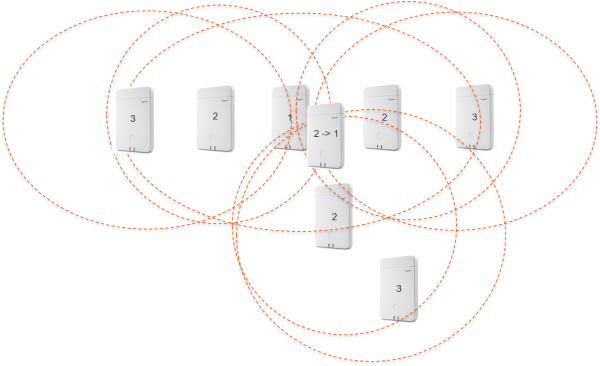 If the base station with level 1 is down then the complete DECT multi-cell system will be down and no calls are possible.
For this in software 2.29.0 or higher a new feature is implemented.
You can add an extra DECT base station and enable the option "Act as Sync Master redundancy"

This setting can be changed, go to: SETTINGS - BASE stations - Administration and Edit the base - Act as Sync Master redundancy
When enabled:
- DECT base will get sync level 2→1
- DECT base can handle calls like every other base
- If level 1 goes down, it will take over the role of level 1
- DECT level 1
- LAN Master if enabled
- It will take 10 minutes before the device takes over the level 1 (Time cannot be changed)
- If level 1 comes back then it will be switched automatic to level 2→1 and will be the redundant base
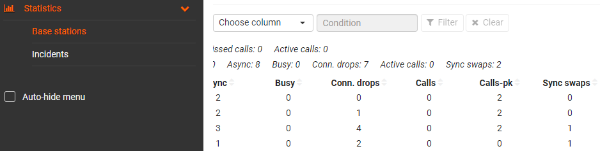
The Base station events page has a new column Sync swaps that will be increased if the Swap has taken place.
DECT manager redundancy. Not valid for N610 and N670 !!!
DECT manager redundancy is described here: FAQ Redundancy - DECT Manager (DM)
Integrator
When the Integrator is installed on a VMware, the redundancy is done via the VMware and it is not an N870 feature.