

FAQ - Base stations synchronisation
Valid for: |
|
| N670 | N770 | N870 | N870E | Embedded Integrator | Virtual Integrator |
Introduction
Synchronisation and the logical structuring of the base stations in clusters are prerequisites for the functioning of the multicell system, intercell handover, and (over)load balancing. Overload balancing means that a handset can roam to a free base, when current base is fully loaded and
cannot accept further handset connections.
Base stations can be synchronised "over the air", meaning that they are synchronised via DECT. If the DECT connection between specific base stations seems to be not reliable enough, synchronisation can also take place via LAN. To carry out the synchronisation you will need the plan of the clusters with the synchronisation level for each base station.
For detailed information on DECT network planning, please refer to the "N870 IP PRO - Site Planning and Measurement Guide".
A base station shows its synchronisation status with an LED
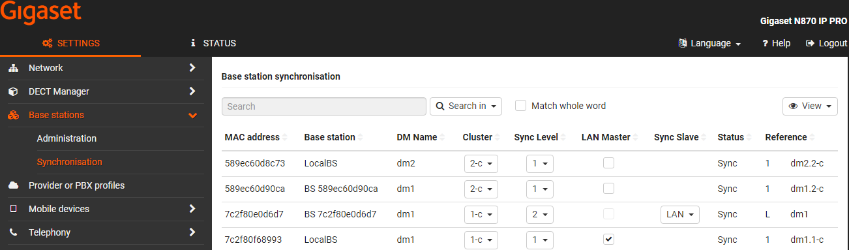
There are multiple options to change/save the synchronisation settings.
- Change settings and press Set. The system will add the changed Bases to the Sync chain without stopping the complete sync chain for this cluster
- Select the DM and press Synchronise all. The synchronisation for all Bases within this cluster will be stopped and started again.
- Select the Cluster of the selected DM, change the Sync Slave to DECT
 and press Synchronise. All Base stations of this Cluster will be changed to DECT slave and the synchronisation of this cluster will be started new.
 - Select the Cluster of the selected DM, change the Sync Slave to LAN
 and press Synchronise. All Base stations of this Cluster will be changed to LAN slave and the synchronisation of this cluster will be started new.
 - Select the Cluster of the selected DM, change the Sync Slave to Mixed
 and press Synchronise. The synchronisation of all Base stations of this Cluster will be stopped and started again.