

FAQ - Broadsoft XSI Phone books.
Valid for: | N530 | N610 | N670 | N770 | N870 | N870E | Embedded Integrator | Virtual Integrator |
Introduction
Broadsoft supports the following phone books:
- Personal
- Group
- Group Common
- Enterprise
- Enterprise Common
These phonebooks can be used on the DECT professional handsets.
Web-interface
In the web-interface go to:SETTINGS - Telephony - XSI Services
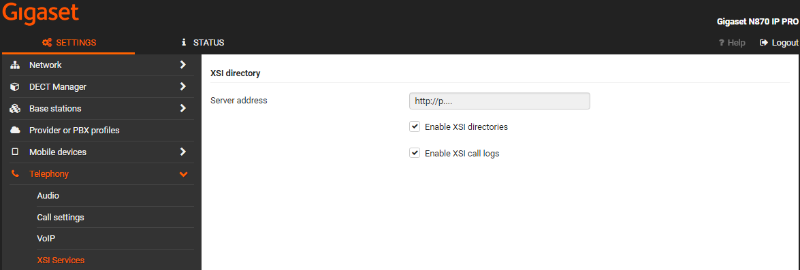
Parameter | Description | Auto provisioning |
|---|---|---|
Server address | The URL of the XSI server | XSIDir.1.ServerURL |
Enable XSI directories | Enable or disable the usage of XSI phonebooks | DmGlobal.0.XSINetdirs (0=Disable / 1=Enable) |
Enable call logs | Enable or disable the usage of XSI call logs | DmGlobal.0.XSICallLogs (0=Disable / 1=Enable) |
In the web-interface go to:SETTINGS - Online directories - XSI
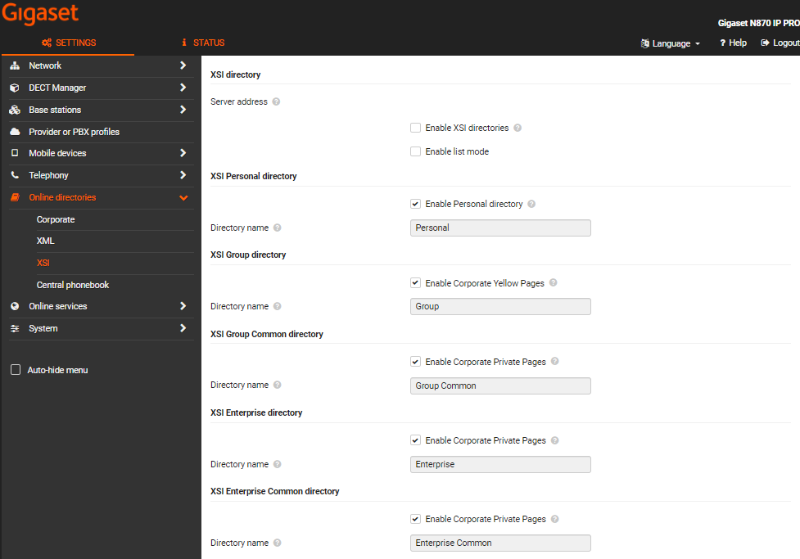
Parameter | Description | Auto provisioning |
|---|---|---|
Server address | The URL of the XSI server | XSIDir.1.ServerURL (Setting is done in XSI services) |
Not in the web-interface | This is pasted behind the XSI server URL: Can be changed if needed. Value = com.broadsoft.xsi-actions/v2.0 | XSIDir.1.Api |
Enable list mode | 0 = disabled | XSIDir.1.StartWithList |
Enable XSI directories | Enable or disable the usage of XSI phonebooks | |
Enable Personal directory | XSIDir.1.PDirName | |
Directory name | ||
Enable Group directory | XSIDir.1.GDirName | |
Directory name | ||
Enable Group Common directory | XSIDir.1.GCDirName | |
Directory name | ||
Enable Enterprise directory | XSIDir.1.EDirName | |
Directory name | ||
Enable Enterprise Common directory | XSIDir.1.ECDirName | |
Directory name |
In the web-interface go to:SETTINGS - Mobile devices - Administration and select the handset

Parameter | Description | Auto provisioning |
|---|---|---|
Use SIP credentials | For Authentication use the SIP credentials or the Broadsoft XSI username and Password | hs.<IPUI>.XsiSip (0=Use XSI credentials / 1 = Use SIP credentials) |
hs.<IPUI>.XsiUsername | ||
hs.<IPUI>.XsiPassword |
DECT handset
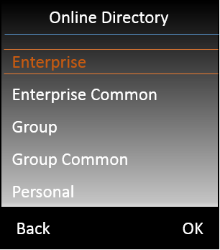
On the handset press the Phone book key  to open the list with available Phone books. Which phonebooks are visible depends on the setting made by the Administrator.
Lookup
New in software 2.47 we have added the possibility to do an lookup in multiple XSI directories.
The Admin can configure up to 5 XSI directories as a lookup dir in any order. Search will be performed one be one in directories selected for lookup. If number is found in some phonebook, searching is not continued in other phonebooks. If the TLS protocol is used: Searching in next directory reuse previous TLS session, so only one TLS session is created to do a lookup.
Configuration
To configure XSI multiple lookup, the admin should change following settings for handset via provisioning:
- AutoLookupDir - for multiple lookup should be set for value 4
- AutolookupOrder - should be filled by XSI directories ID in specified order of search, separated by commas. AutolookupOrder can be filled by max 5 XSI directories (with ID 5-9). Default value is "9,7,8,5,6" (Personal, Group, Group Common, Enterprise, Enterprise Common).
XSI ID for auto lookup settings:
- 5 - Enterprise
- 6 - Enterprise Common
- 7 - Group
- 8 - Group Common
- 9 - Personal
Example of provisioning file
<?xml version="1.0" encoding="UTF-8"?> |
Lookup caching policy
You can change the Lookup caching policy, see this wiki page: FAQ - Lookup caching
New in software 2.46:
During the XSI multiple lookup cache is checked and the number is stored according to rules for each XSI phonebook separately (for phonebook which currently is being searched). Default value for each directories for caching is 1 (ask every loop). The main improvement in caching for XSI multi lookup is that entries from caching is shared between HS. So if one of the HS save entry in cache, other HS can use name replacement from cache (if the number and type of directory is the same). Only the XSI personal should be queried for each handset separately - so for Personal directories entries in cache are not shared between HS.