

FAQ - Call settings
Valid for: | N530 | N610 | N670 | N770 | N870 | N870E | Embedded Integrator | Virtual Integrator |
Introduction
On this page you can make advanced settings for VoIP connections.
It is only available in the Integrator user interface for the user role admin.
Call Transfer
Participants can transfer a call to another participant as long as the PBX/provider supports this function. The call is transferred using the handset menu (via the display key) or using the R key. You can expand or change the settings for call transfer.
Call transfer via R key
Activated: Users can connect two external callers with each other by pressing the R key. The connections with both parties are terminated.
Transfer call by on-hook
Activated: The two participants are connected with one another when the user presses the end call key. The intermediary's connections with the participants are terminated.
Determine target address
Select how the transfer target address (Refer-To URI) is to be derived:
- From transfer target's AOR (Address of Record)
- From transfer target's transport address (Contact URI)
Most common PBX platforms show good results by using the AOR as transfer target address.
In case there are problems with transfer especially via transparent proxies, rather than call switching PBX, it might be worthwhile to test with transfer target address derived from transfer target’s transport address.
Ignore access and area codes
This feature is available from Software version 2.57.0 or higher.
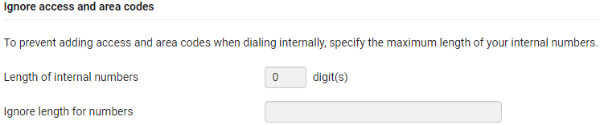
To prevent adding access and area codes when dialing internally, specify the maximum length of your internal numbers.
- Length of internal numbers
- Ignore length for numbers
Web-interface:
Auto-provisioning:
Parameter | Value | Description |
|---|---|---|
Telephony.0.IntNumberMaxLen | 0 - 9 | 0 = Disabled |
Telephony.0.EmergencyNumbers | Emergency numbers, comma separated | |
Example: <?xml version="1.0" encoding="UTF-8"?> <provisioning version="1.1" productID="e2"> <nvm> <param name="Telephony.0.IntNumberMaxLen" value="3" /> <param name="Telephony.0.EmergencyNumbers" value="123,112,911" /> </nvm> </provisioning> | ||
Access Code
You may have to enter an access code for external calls (external prefixes e.g., "0"). You can save this access code in configuration. These settings apply to all registered handsets.
See: FAQ - Access code
Area Codes
If you use VoIP to make a call to the fixed line, you may also have to dial the area code for local calls (depending on the provider).
You can set your telephone system so that the access code is automatically predialled when any VoIP call is made in the same local area, and also for national long-distance calls. This means that the access code is set before all phone numbers that do not start with 0 – even when dialling numbers from the directory and other lists.
You can change these settings if required.
See: FAQ - Area codes
Tone Selection
Tones (e.g., dialling tone, ring tone, busy tone or call waiting tone) vary from one country or region to another. You can choose from various tone groups for your telephone system.