

FAQ - Central phone-book.
Valid for: | N530 | N610 | N670 | N770 | N870 | N870E |
| Virtual Integrator |
Introduction
Central phone book:
- 2000 entries (N530 500 entries) or
- 2MB file size
- Valid for:
- Small systems
- Medium systems
- Large systems (Virtual Integrator: Software 2.57.0 or higher. Configuration via auto-provisioning only, web-interface configuration is hidden.)
- Not available for Large systems using the Embedded Integrator
- Integrator host the Central phonebook, DECT managers query the phonebook using secure connection. Large number of Handsets and Security can cause high load that could cause stability issues, therefore not supported by embedded integrator. Solution is to use the Virtual integrator.
- "Refresh now" in web-interface option: Software 2.57.0 or higher
The phone book can be configured via the:
- Web-interface
- Provisioning
Click here for an Excel file that generates a phonebook.xml file you can import.
Click here for an html file that generates a phonebook.xml file you can import.
File format
The phonebook file has the following format, example:
<?xml version="1.0" encoding="utf-8"?>
<!DOCTYPE LocalDirectory>
<list>
<entry home2="" surname="Lastname" mobile1="" mobile2="" office1="0049123456789" office2="" name="Firstname" home1=""/>
<entry home2="" surname="User" mobile1="0049987654321" mobile2="" office1="" office2="" name="First" home1=""/>
</list>
Download an example template.
Web-interface
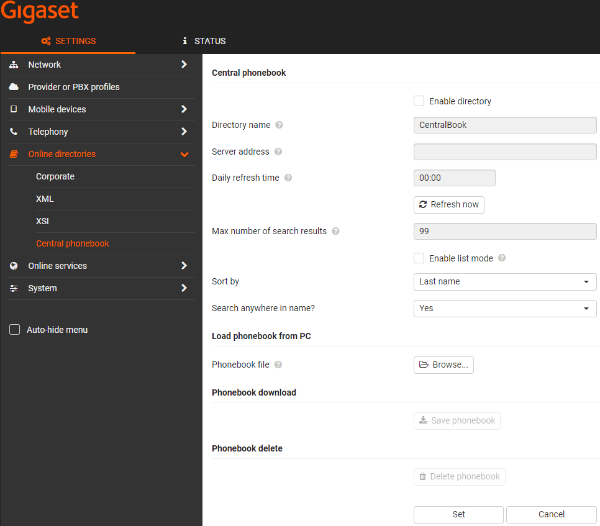
Go to: Settings - Online Directories - Central Phonebook.
You can select the phonebook (XML) file to upload.
Enter the URL and Daily Refresh Time via the Web-interface.
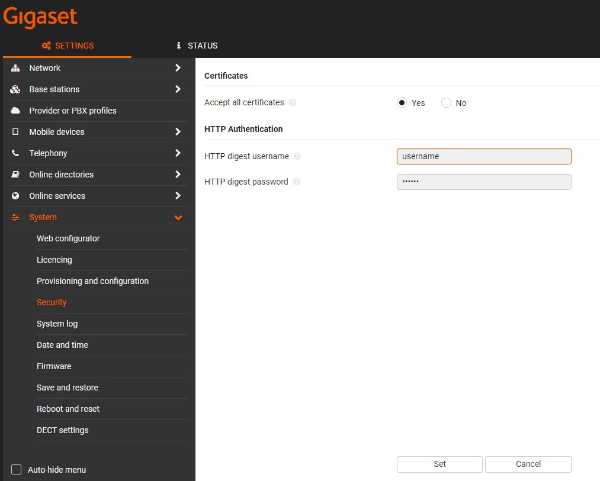
Go to: Settings - System - Security
You can enter username and password here, if applicable.
Auto-provisioning
Parameter | Value | Description |
|---|---|---|
Netdir.21.Activated | 0 = Disabled | Enable/Disable Central phonebook |
CentralBook.0.Name | Directory name | |
CentralBook.0.ServerURL | Server address | |
CentralBook.0.DownloadTime | HH:MM | Daily refresh time |
CentralBook.0.MaxSearchResult | Max: 99 | Maximum results for central phone-book search |
CentralBook.0.StartWithList | 0 = Search mode | Enable list mode if disabled then Search window is used |
CentralBook.0.SortBy | surname | Sort by |
CentralBook.0.SearchAnywhereInName | 0: No | Search anywhere in name? |