

FAQ - DECT measurement procedure
Valid for: |
|
| N670 | N770 | N870 | N870E | Embedded Integrator | Virtual Integrator |
Introduction
Here we describe the new measurement procedure.
Required:
- N870/N870E base with software version 2.53 or higher. (N610 or N670 also support this feature but as measurement is done in multisite environment, it is not relevant for these devices.)
- Calibrated handset with software 12.02 or higher:
- R700H SPK PRO
- Non calibrated handset with software 12.02 or higher:
- R700H PRO / S700H PRO / SL800H PRO
- R700H PRO / S700H PRO / SL800H PRO

Start the measurement procedure via dialing ***922
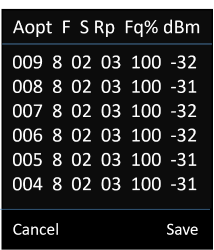
The following screen will be visible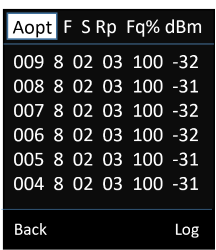
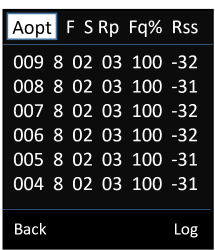
Antenna mode
- Aopt = in call optimized antenna
- A50 = 50% mix of 2 antennas for idle status quality measurement
Antenna mode status information is heading the first column,
which is counter of the measurement values obtained during the given call.
As measurement values are updated every 960ms,
it roughly gives a timestamp in the measurement call in seconds.Frequency (F)
Slot (S)
RPN (Rp)
Frame quality (Fq%)
dBm => RSSI indication from calibrated measurement handset.
Rss => rough RSSI indication from non-calibrated handset.
Click on "Log" to start an measurement and save the values on the DECT system.
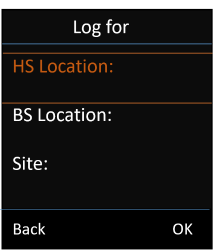
HS Location
BS Location
Site
Enter the Location information as the naming will be used when saving the measurement data.
Press "OK" to start the measurement.- Measurement is started,
- Click on "Stop" to end the measurement or
- Measurement will stop automatic after 60 seconds
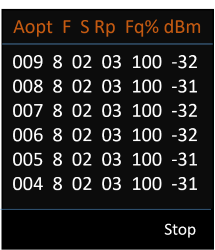
- Click on "Save" to save the measurement.
- On the DECT system there will be 2 files per measurement log.
- <Site>_<BS Location>_<HS Location>_Measurement.csv
- <Site>_<HS Location>_dps.csv
Measurement.csv file:
- Column calibrated
1 = Calibrated handset
0 = Non calibrated handset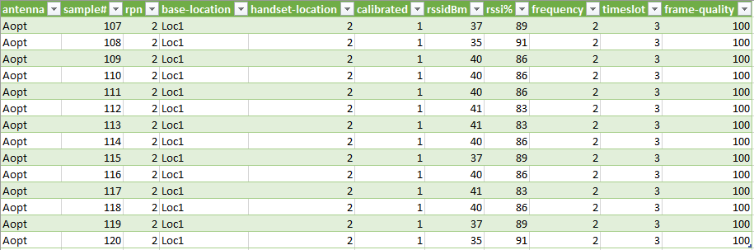
dps.csv file: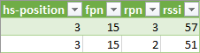
- Column calibrated
dps location information
The file dps.csv contains information about all bases seen by the handset, this feature can be used to measure in running installations.

Change antenna mode via auto-provisioning
<provisioning version="1.1" productID="e2">
<nvm>
<!--
0x00 //current best antenna-diversity algorithm
0x13 //Dummy-Bearer Algorithm ~50% per antenna
-->
<param name="DmGlobal.0.DECTAntennaMode" value="0x00" />
</nvm>
</provisioning>
How to download the measurement files
The measurement files can be downloaded via:
Web-interface:
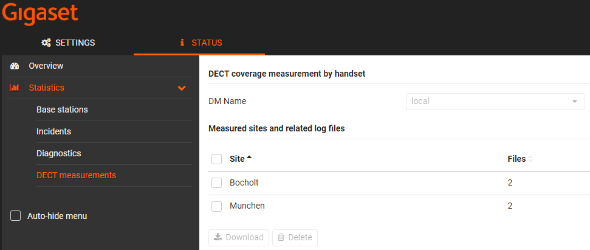
From Software 2.54 or higher, download of measurement files via the web-interface is supported.
Open the web-interface and go to: STATUS - Statistics - DECT measurements, here you can download/delete the measurements files that are on the system. In case you have an Integrator system, you need to select the DECT manager where you started/stored the measurement files.
CLI:
Usage: measure-dump [<options>]
-h Show this help
-l Lists all sites of which measurement logs are available
-r <site> Remove the generated measure-dump.tar file (/tmp/pub/measure-dump.tar)
and the measurement logs of given site (dflt: all sites)
<site> Dump measurement of given site, if option is not provided, all sites will be dumped
Note: Don't forget to remove your measurement data, if download was successful.
Otherwise you might leave your data on the measurement device.
that can list the sites for which measurement logs are available
cli@base-dm-int-7c2f80c6e48e:~$ measure-dump -l
Aaa
Bbb
Ccccollect measurement data for one site Aaa
cli@base-dm-int-7c2f80c6e48e:~$ measure-dump AaaDownload ( example via scp , also available under Windows CMD box )
gigaset@ubuntu:~$ scp cli@192.168.3.202:/tmp/pub/measure-dump.tar .
cli@192.168.3.202's password:
measure-dump.tar 100% 293 0.3KB/s 00:00Example of tar file structure for one site Aaa
gigaset@ubuntu:~$ tar t -f ./measure-dump.tar
measurements/00001_Aaa/
measurements/00001_Aaa/Aaa_BsA_HsLocB_measurement.csv
measurements/00001_Aaa/Aaa_BsA_HsLocC_measurement.csv
measurements/00001_Aaa/Aaa_HsLocB_dps.csvcollect measurement data for all sites
cli@base-dm-int-7c2f80c6e48e:~$ measure-dumpDownload ( example via scp , also available under Windows CMD box )
gigaset@ubuntu:~$ scp cli@192.168.3.202:/tmp/pub/measure-dump.tar .
cli@192.168.3.202's password:
measure-dump.tar 100% 293 0.3KB/s 00:00Example of tar file structure for three sites
gigaset@ubuntu:~$ tar t -f ./measure-dump.tar
measurements/
measurements/00001_Aaa/
measurements/00001_Aaa/Aaa_BsA_HsLocB_measurement.csv
measurements/00001_Aaa/Aaa_BsA_HsLocC_measurement.csv
measurements/00001_Aaa/Aaa_HsLocB_dps.csv
measurements/00002_Bbb/
measurements/00002_Bbb/Bbb_BsA_HsLocB_measurement.csv
measurements/00002_Bbb/Bbb_BsA_HsLocC_measurement.csv
measurements/00002_Bbb/Bbb_HsLocB_dps.csv
measurements/00003_Ccc/
measurements/00003_Ccc/Ccc_BsA_HsLocB_measurement.csv
measurements/00003_Ccc/CccHsLocB_dps.csvDelete measurement logs for one site Aaa
cli@base-dm-int-7c2f80c6e48e:~$ measure-dump -r Aaa
cli@base-dm-int-7c2f80c6e48e:~$ measure-dump -l
Bbb
CccDelete measurement logs for all sites
cli@base-dm-int-7c2f80c6e48e:~$ measure-dump -r
MEASUREMENT: /tmp/pub/measure-dump.tar does not exist
cli@base-dm-int-7c2f80c6e48e:~$ measure-dump -l
cli@base-dm-int-7c2f80c6e48e:~$
Web-browser download via URL
You can download this file also via your browser, example: https://<IP address>/pub/measure-dump.tar