FAQ - Distinctive ring
Valid for: | N530 | N610 | N670 | N770 | N870 | N870E | Embedded Integrator | Virtual Integrator |
Introduction
Distinctive Ring offers the possibility to use different ringtones for Internal, external, group, door, emergency and optional calls.
This feature is implemented from software 2.26 or higher.
The Platform / provider has to send the correct information using the Alert-Info: Header.
Example: Alert-Info: <http://www.example.com>;info=alert-group
The N670/N870 supports the following options:
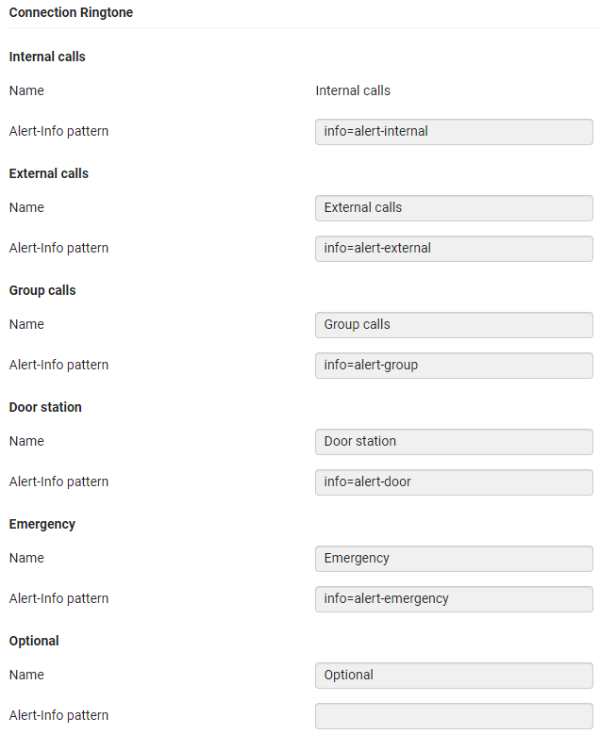
Name | Alert-Info Header contains |
|---|---|
Internal Calls | info=alert-internal |
External Calls | info=alert-external |
Group Calls | info=alert-group |
Door station | info=alert-door |
Emergency | info=alert-emergency |
Optional | "Empty" |
The names (except Internal calls) and header can be changed according to your wishes.
DECT handset settings
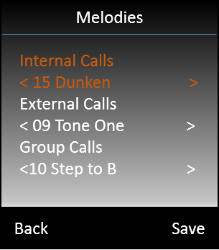
As DECT handsets have there own ringtones inside and DECT handsets settings can't be changed via auto-provisioning, the user needs to select via the DECT handset menu structure the ringtone.
On the DECT handset: Menu - Settings - Audio Settings - Ringtones (Handset) - Melodies
Auto-provisioning
Parameter | Value |
|---|---|
DmGlobal.0.SupportSipRingtones | 0 = Disabled |
SipRingtones.0.DefaultTone | The tone played when the Alert info header is not recognized. By default the External ringtone is played. 0 = Internal |
SipRingtones.0.RingToneName0 | Internal Calls (This can not be changed) |
SipRingtones.0.RingInfo0 | info=alert-internal (If you make this "Empty" it will disappear in the DECT handset menu) |
SipRingtones.0.RingToneName1 | External Calls |
SipRingtones.0.RingInfo1 | info=alert-external (If you make this "Empty" it will disappear in the DECT handset menu) |
SipRingtones.0.RingToneName2 | Group Calls |
SipRingtones.0.RingInfo2 | info=alert-group (If you make this "Empty" it will disappear in the DECT handset menu) |
SipRingtones.0.RingToneName3 | Door station |
SipRingtones.0.RingInfo3 | info=alert-door (If you make this "Empty" it will disappear in the DECT handset menu) |
SipRingtones.0.RingToneName4 | Emergency |
SipRingtones.0.RingInfo4 | info=alert-emergency (If you make this "Empty" it will disappear in the DECT handset menu) |
SipRingtones.0.RingToneName5 | Optional |
SipRingtones.0.RingInfo5 | By default this is empty (If you make this "Empty" it will disappear in the DECT handset menu) |
Example: <param name="SipRingtones.0.DefaultTone" value="0"/> If you would like to disable this new feature you need to do this via auto provisioning. | |
Web-interface
In the web-interface go to: SETTINGS - Provider or PBX profiles - Edit - Connection Ringtone