

FAQ - Reboot and Reset to factory default
Valid for: | N530 | N610 | N670 | N770 | N870 | N870E | Embedded Integrator | Virtual Integrator |
Resetting the device to factory settings
You can reset the device to factory default via:
- Web-interface
- Changing the device role using the key procedure
- Power procedure
- Emergency reset to factory settings
Web-interface
Open the web-interface and go to: SETTINGS - System - Reboot and reset - Reset to
Select the role of the device that it should have after factory reset.
- All in one - dynamic IP (Integrator + DECT Manager + DECT base)
- All in one - static IP (Integrator + DECT Manager + DECT base)
- DECT manager + Base - dynamic IP (Device is connected to Virtual or Embedded Integrator)
- DECT manager + Base - static IP (Device is connected to Virtual or Embedded Integrator)
- Integrator only - dynamic IP (Embedded Integrator)
- Integrator only - static IP (Embedded Integrator)
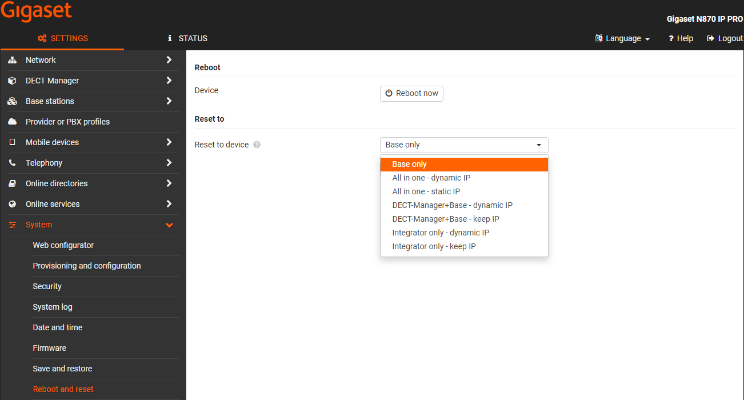
Click "Reset to" to start the factory reset.
Resetting base stations to factory settings via power procedure
Resetting the device to factory settings by power procedure could only be applied to devices in role base-only.
Reset to factory settings can be performed by re-powering the device between 30s and 40s since power-up.
The number of repetitions of re-power during the time window of 30s to 40s since power-up,
is defining the role-set, to which the base is reset:
- First power-up + two additional re-power in time window 30s - 40s since previous power-up: ==> will end in a reset to base role.
- First power-up + four additional re-power in time window 30s - 40s since previous power-up: ==> will end in a reset to base-dm-int role
Emergency reset to factory settings
When the device is booting
- Press the device button for at least 10 seconds until all LEDs switch off release the button . . . the device is now in programming mode. Left LED lights green.
- Press the device button for at least four seconds and no longer than 10 seconds. . . the device is reset and rebooted.