

FAQ - SIP Message
Valid for: |
|
| N670 | N770 | N870 | N870E | Embedded Integrator | Virtual Integrator |
Introduction
The N670/N770/N870 is capable of showing SIP messages on the DECT handsets.
The SIP message are automatic converted to an MQTT message using the following MQTT settings.
- Title= "Info"
- Priority = "3"
- Time To Live = "3600"
- alert-info = "msg-melody-medium"
- Presentation timer = "30"
How to enable SIP messaging feature on a DECT handset
- The N670/N870 must have software 2.41 or higher
- You need to have a messaging license per handset that needs to show messages: FAQ - Messaging and Location license
- You need to enable the handset message feature: FAQ - Messaging and Location how to enabledisable per handset
How to send a SIP message
Install a program like SIPSAK to send SIP messages.
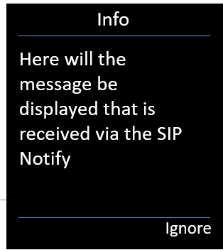 sipsak -i -M -B "Test" -s sip:Name@PhoneIP
Auto-provisioning
The following provisioning parameters are available to influence the signaling behavior.
Parameter | Description |
|---|---|
SipProvider.0.AML_TitleText | Title text see: FAQ Nx70 - Messaging "4 Title" Default: "Info" |
SipProvider.0.AML_Prio | MQTT priority see: FAQ Nx70 - Messaging "2 Prio" Default: "3" |
SipProvider.0.AML_TTL | MQTT TTL timer see: Default: "3600" |
SipProvider.0.AML_AlertInfo | MQTT ringtone see: FAQ Nx70 - Messaging "3 Ringtones" Default: "msg_melody_mid" |
SipProvider.0.AML_PresentationTimer | MQTT presentation timer see: FAQ Nx70 - Messaging "12 Presentation time" Default: "30" |
Example: <?xml version="1.0" encoding="UTF-8"?> <nvm> <param name="SipProvider.0.AML_TitleText" value="Info"/> </nvm> | |