

FAQ - XHTML (RAP)
Valid for: | N530 | N610 | N670 | N770 | N870 | N870E | Embedded Integrator | Virtual Integrator |
Introduction
The N870 is able to show XHTML pages.
You can create your own Application like an PBX Manager that the user could use to control his PBX functionality. Like:
- Voicemail
- Call Lists
- Phonebooks
- DND
- Login / Logoff
- Call Forwarding
- ...
In the N720 and N510 we called this feature RAP.
For more detailed information about the XHTML protocol, check this wiki page.
Web-interface
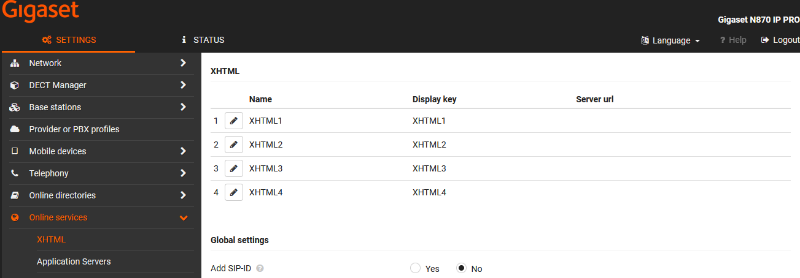
Open the N870 web-interface and go to: SETTINGS - Online services - XHTML
There are up to 4 XHTML services possible.
Parameter | Auto-provisioning parameter | Description |
|---|---|---|
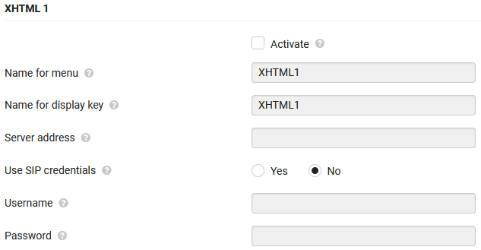
Activate | RapService.< 3-6>.Activated | Enabled or Disable the selected XHTML service |
Name for menu | RapService.< 3-6>.Name | Name visible in the handset menu when selecting this service |
Name for display key | RapService.< 3-6>.SoftkeyName | Name of the softkey, this is limited to 8 characters |
Server address | RapService.< 3-6>.ServerURL | The URL of the XHTML service |
Use SIP credentials | RapService.< 3-6>.UseSIP | In case of authentication is needed, you can use the SIP credentials or enter your own credentials. |
Username | RapService.< 3-6>.Username | |
Password | RapService.< 3-6>.Password | |
Add SIP-ID | DmGlobal.0.AddSipId | Add the SIPID in the HTTP get request to identify the handset/account. |
Auto-provisioning
Here is an auto provisioning example: