

FAQ - DECT Manager Administration
Valid for: |
|
| N670 | N770 | N870 | N870E | Embedded Integrator | Virtual Integrator |
Introduction
This page provides the list of DECT Managers that are available.
For Small and Medium systems there is only one DECT Manager available. Large systems will have more DECT Managers.
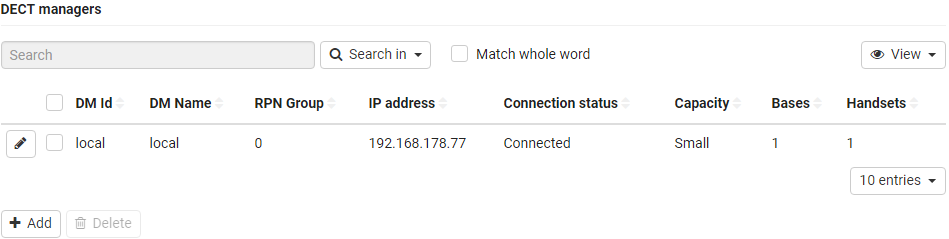
Parameter | Description |
|---|---|
DM Id | DECT manager identification within the multicell system. It is assigned automatically. The identity must be used when registering the DECT manager at the Integrator. After the DECT manager has been added, you should note this identifier to have it available, when you will have to enter the account data later at the DECT manager. |
DM Name | The name is used to identify the DECT manager within DECT manager lists. Enter a meaningful name for the DECT manager, e.g., referring to the location or organisational unit. |
Part of the RFPI for a DECT manager. PARI and RPN must be locally unique in order to achieve that the RPN group allocated for the base stations of a DECT manager is locally unique in the system too. Select the RPN group number for the DECT manager from the option menu. Values: 0 – 3 | |
PMID/TPUI Group | DECT manager specific handset group. It is assigned automatically, when the DECT manager is added to the system. PMID (Portable part MAC IDentity) uniquely identifies an active handset |
IP address | IP address of the DECT manager. |
Connection status | Shows whether the DECT manager is currently connected to the multicell system or not (Connected / Not connected). |
Capacity | The value indicates how many base stations, handsets and calls can be handled by the DECT manager. It depends on the activation of the local base of this DECT manager. The actual values are shown in the Bases limit, Handsets limit and Calls limit columns. |
Basis | Number of configured Bases. |
Handsets | Number of configured Handsets. |
Bases Limit | Maximum number of base stations that are allowed to be assigned to the DECT manager. |
Handsets Limit | Maximum number of handsets that are allowed to be registered at the DECT manager. |
Call Limit | Maximum number of calls that are allowed to be active simultaneously. |
Actions
Adding a DECT manager to the list.
- Click on Add . . . the DECT manager page is opened.
Deleting a DECT manager from the list.
- Select the check box next to the DECT manager you want to delete. Multiple choice is possible. Click on Delete Confirm with Yes . . . all selected DECT managers are deleted.
Editing the data of a DECT manager.
- Click on the edit icon next to the DECT manager you want to edit . . . the DECT manager configuration page is opened